What Is Cloud Computing? AWS, Azure and Google Cloud Simply Explained
A simple explanation of cloud computing: how it works, the difference between IaaS, PaaS and SaaS, and how AWS, Microsoft Azure and Google Cloud compare.
By Taqnio TeamPublished Updated 11 min read
In this article
- Cloud computing explained with a simple example
- The official definition (NIST)
- How the cloud works behind the scenes
- IaaS, PaaS and SaaS: the three service models
- Public, private, community and hybrid cloud
- AWS vs Azure vs Google Cloud
- Data location: regions in the Middle East
- Benefits and drawbacks of the cloud
- Shared responsibility: what the provider does and what you do
- Common mistakes and how to avoid them
- What to check before you choose a provider
- How to start learning cloud computing
- Sources
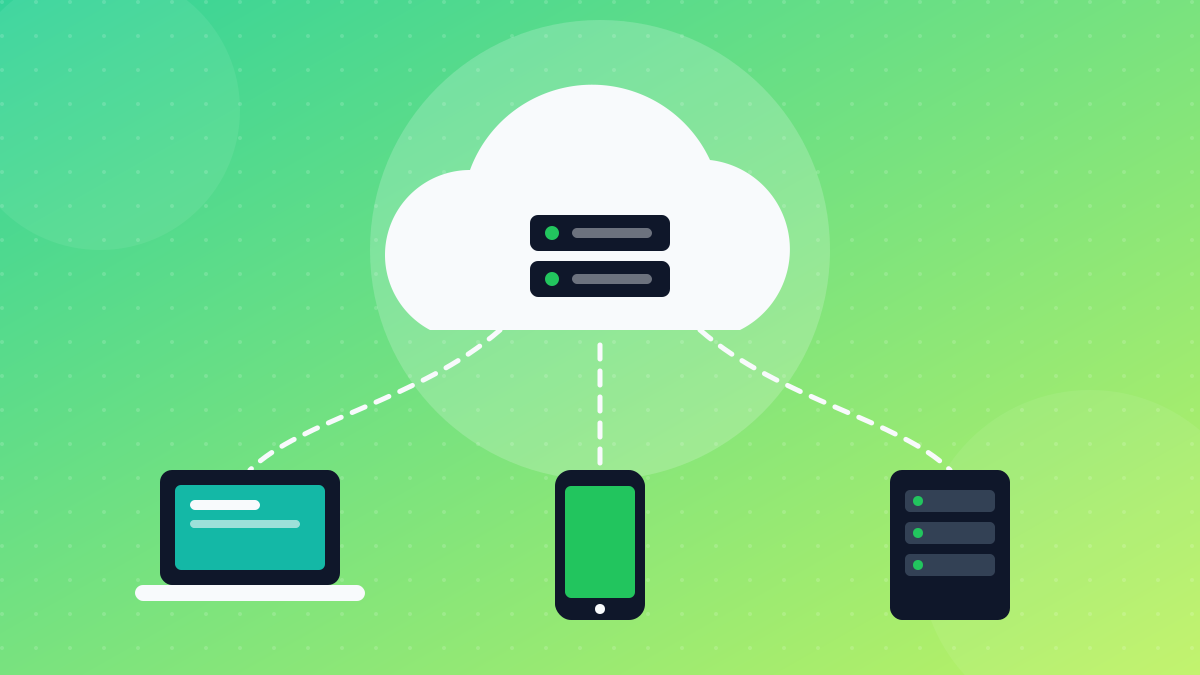
Cloud computing means renting computing resources, such as servers, storage, databases and software, over the internet instead of buying and running your own hardware. You use what you need, when you need it, and usually pay only for what you use. AWS (Amazon Web Services), Microsoft Azure and Google Cloud are the three largest providers.
In short: the cloud is someone else's data centre that you can use on demand. It comes in three main service models (IaaS, PaaS and SaaS), and AWS, Azure and Google Cloud all offer similar core services under different names.
Cloud computing explained with a simple example
Think about electricity. You don't build a power station at home; you plug in and pay for what you use. Cloud computing works the same way for computing power.
Without the cloud, a company launching a website would buy servers, find a room to keep them in, install the operating system, handle cooling and power, and replace broken parts. If traffic suddenly grew, it would need to buy more servers, which takes weeks.
With the cloud, the same company can create a server in minutes from a web console, add more servers when traffic grows, and switch them off when they're no longer needed. You already use the cloud every day: webmail, online document editors, photo backup on your phone and streaming services all run in cloud data centres.
The official definition (NIST)
The most widely cited definition comes from the US National Institute of Standards and Technology, in NIST Special Publication 800-145 (September 2011). It describes cloud computing as a model for convenient, on-demand network access to a shared pool of configurable computing resources that can be rapidly provisioned and released with minimal management effort or provider interaction. NIST breaks the model into five essential characteristics, three service models and four deployment models.
The five essential characteristics:
- On-demand self-service: you provision resources yourself, without talking to a person at the provider.
- Broad network access: services are reached over the network from phones, tablets, laptops and workstations.
- Resource pooling: the provider serves many customers from shared resources (a multi-tenant model).
- Rapid elasticity: you can scale up and down quickly.
- Measured service: usage is metered and reported, which is why you pay for what you use.
How the cloud works behind the scenes
Cloud providers run huge data centres filled with servers, storage and networking equipment. A few key ideas make it work:
- Virtualisation: one physical server is divided into many virtual machines, so resources can be shared safely between customers.
- Regions: providers group their data centres by geographic region. You choose where your services run, which matters for speed and for data residency rules. See the data location section below for the current Middle East picture.
- Availability zones: within a region, separate data centre locations let you run copies of your app so that a failure in one place doesn't take everything down.
- Self-service and pay-as-you-go: you create and remove resources yourself, through a web console, command-line tool or API, and you're billed based on usage. If APIs are new to you, see our explanation of what an API is.
IaaS, PaaS and SaaS: the three service models
Cloud services are usually grouped by how much the provider manages for you. These are the three models in the NIST definition.
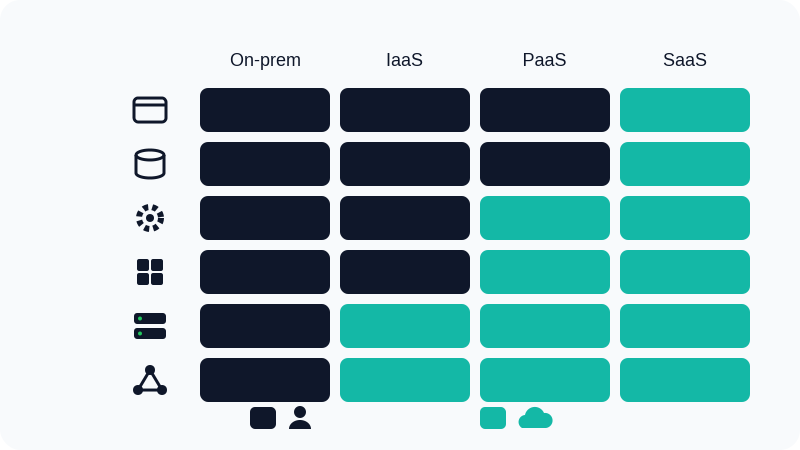
- IaaS (Infrastructure as a Service): you rent virtual machines, storage and networking. You install and manage the operating system and everything above it. Examples: Amazon EC2, Azure Virtual Machines, Google Compute Engine.
- PaaS (Platform as a Service): you upload your code and the platform handles the servers, operating system and runtime. Examples: AWS Elastic Beanstalk, Azure App Service, Google App Engine.
- SaaS (Software as a Service): you simply use finished software in your browser or app. Examples: Gmail, Microsoft 365, Dropbox.
In the diagram below, each row is a layer (from top to bottom: application, data, runtime, operating system, servers and networking). Dark cells are managed by you and teal cells by the cloud provider.
Many modern tools sit between these categories. Container platforms, for example, let you ship your app as a container without managing servers; our Docker for beginners guide explains containers from scratch.
Public, private, community and hybrid cloud
NIST defines four deployment models:
- Public cloud: resources are hosted by a provider like AWS, Azure or Google Cloud and shared across many customers, while each customer's data stays isolated.
- Private cloud: cloud infrastructure provisioned for exclusive use by a single organisation, either in its own data centre or hosted for it.
- Community cloud: infrastructure shared by a specific group of organisations with common concerns, such as a group of government bodies.
- Hybrid cloud: a mix of two or more of the above, for example keeping sensitive systems on-premises while running the website in the public cloud.
You will also hear multi-cloud, meaning services from more than one public cloud provider. It is a common industry term rather than one of NIST's four models.
AWS vs Azure vs Google Cloud
The three big providers offer similar building blocks, just with different names. The free offers below were checked on the providers' own pages on 20 November 2026.
| AWS | Microsoft Azure | Google Cloud | |
|---|---|---|---|
| Company | Amazon | Microsoft | |
| Virtual servers | Amazon EC2 | Azure Virtual Machines | Compute Engine |
| Object storage | Amazon S3 | Azure Blob Storage | Cloud Storage |
| App platform (PaaS) | Elastic Beanstalk | Azure App Service | App Engine |
| Often chosen for | The widest range of services and a large community | Organisations already using Microsoft products | Data, analytics and Kubernetes |
| New-user free offer | $100 on sign-up plus up to $100 more for using key services (up to $200 over 6 months) | $200 credit to use within 30 days, plus 20+ services free for 12 months | $300 credit over 90 days |
| Always-free usage | 30+ services within monthly limits | 65+ services within monthly amounts | Free Tier products such as BigQuery (1 TiB of queries a month) and Cloud Run (2 million requests a month) |
There's no single "best" provider. Skills transfer well between them, because the core concepts (compute, storage, networking, identity and billing) are the same. Free tiers and credits change often, so check the official pages (AWS, Azure, Google Cloud) before relying on them.
A few details worth knowing:
- AWS: the free plan covers select services and the account closes after 6 months or when credits run out, unless you upgrade to a paid plan.
- Azure: sign-up needs a non-prepaid card, a phone number and a Microsoft or GitHub account. After 30 days or when the credit runs out, you must move to pay-as-you-go to keep the account active.
- Google Cloud: you must give a payment method that stays valid during the trial. Always-free items such as the e2-micro virtual machine and 5 GB of Cloud Storage apply only in eligible US regions.
Data location: regions in the Middle East
Where your data sits matters for speed and for local rules. As of 20 November 2026:
- AWS says it has 39 regions and 124 availability zones worldwide. Its page lists announced plans for 2 more regions in Saudi Arabia and Chile, with no launch date, so Saudi Arabia is not a live AWS region on that page.
- Azure lists UAE North, UAE Central, Qatar Central, Israel Central and Saudi Arabia East among its Middle East regions.
- Google Cloud lists 43 regions and 130 zones (page updated 27 March 2026) and has a Dammam region with its own access document.
Always check the provider's live region map before you promise a customer that data stays in a given country. Free-tier limits can be region specific, as the Google Cloud example above shows.
Benefits and drawbacks of the cloud
Benefits:
- No large upfront cost: you don't need to buy hardware before you start.
- Scalability: add or remove resources as demand changes.
- Speed: launch servers and services in minutes.
- Reliability: run your app across several locations to survive failures.
- Global reach: serve users from regions close to them.
Drawbacks:
- Unexpected bills: forgetting to switch off a resource, or a sudden spike in traffic, can cost money. Budgets and alerts are essential.
- Complexity: each provider has hundreds of services, which can be overwhelming at first.
- Dependence on the provider: moving from one cloud to another can take effort, especially if you rely on provider-specific services.
- Shared security responsibility: the provider secures the infrastructure, but a misconfigured storage bucket or weak password is still your responsibility.
The cloud also matters for personal data. Keeping copies of important files in cloud storage is part of a good backup plan, as we explain in our guide on how to back up your files properly.
Shared responsibility: what the provider does and what you do
AWS describes it as security "of" the cloud (the provider protects the infrastructure) and security "in" the cloud (your responsibility depends on the services you choose), on its shared responsibility model page. Microsoft's documentation says that whatever the model (IaaS, PaaS or SaaS), you always keep responsibility for your data, endpoints, accounts and access management. Google Cloud describes the same split and adds its "shared fate" approach, where it offers secure starting configurations and guidance (Google Cloud Architecture Framework).
In practice that means strong passwords, multi-factor authentication, least-privilege access, and not leaving storage public by accident. AWS's S3 security best practices recommend using S3 Block Public Access and enabling S3 Versioning, which lets you recover from unintended user actions.
Common mistakes and how to avoid them
- Thinking a budget stops spending. It usually doesn't. Azure's documentation says that when a budget threshold is met, resources aren't affected and consumption isn't stopped. Google says an alerts-only budget does not cap spending. Treat budgets as warnings, and delete what you don't use.
- Expecting instant alerts. AWS Budgets data updates up to three times a day, and AWS warns that you might incur costs beyond your threshold before you are notified. Azure evaluates budgets every 24 hours, and Google says the first notification can take several hours.
- Assuming the provider backs up everything. Under shared responsibility, your data is yours to protect. Turn on versioning or backups and keep a copy elsewhere.
- Leaving storage open to the public. Use the provider's block-public-access controls unless you truly need public files.
- Picking a region at random. Check speed, price, data residency rules and whether the free tier applies there.
What to check before you choose a provider
- Shared responsibility: which parts of the stack will you be managing?
- Backups: where do backups live, and have you tested restoring them?
- Cost controls: have you set a budget alert, and do you know the pricing of what you create?
- Data location: is there a region in or near your country, and do the rules you work under allow it?
- Free offer terms: how long does it last, and what happens when it ends?
- Skills and support: does the provider offer training in a language you are comfortable with?
How to start learning cloud computing
If you want to build cloud skills, here's a practical path:
- Learn the basics: what servers, IP addresses, DNS and HTTP are.
- Pick one provider and stick with it at first. AWS, Azure and Google Cloud are all good choices.
- Create a free account and set a budget alert immediately, before creating anything else.
- Build something small: host a static website, create a virtual machine and connect to it, or store files in object storage.
- Delete what you don't need when you finish each experiment.
- Follow the official learning paths. Each provider offers free training and an entry-level certification if you want a structured goal. Microsoft's Azure Fundamentals page lists the AZ-900 exam in Arabic (Saudi Arabia), among other languages, while Google's Cloud Digital Leader page lists English, Japanese, Spanish, Portuguese and French.
Start small, keep an eye on costs, and within a few weeks the main cloud concepts will feel familiar.
Sources
Checked on 20 November 2026:
- NIST SP 800-145: The NIST Definition of Cloud Computing
- AWS Free Tier
- Microsoft Azure free account
- Google Cloud Free Program documentation
- AWS global infrastructure: Regions and Availability Zones
- Microsoft Azure global infrastructure: geographies
- Google Cloud locations
- AWS shared responsibility model
- Microsoft Learn: shared responsibility in the cloud
- Google Cloud: shared responsibility and shared fate
- AWS Budgets documentation
- Azure Cost Management budgets tutorial
- Google Cloud Billing budgets
- Amazon S3 security best practices
- Microsoft Certified: Azure Fundamentals
- Google Cloud Digital Leader certification
Frequently asked questions
Is cloud computing the same as cloud storage?
No. Cloud storage, such as Google Drive or Dropbox, is one type of cloud service. Cloud computing is the wider idea of renting computing resources over the internet, including servers, databases, networking, storage and ready-made software.
Is it safe to put my data in the cloud?
Major cloud providers invest heavily in physical and digital security, often more than a small company could afford. However, security is shared: the provider secures the infrastructure, while you are always responsible for your data, accounts, access settings and how you configure your services.
Can I try AWS, Azure or Google Cloud for free?
Yes. As of 20 November 2026, AWS offers new accounts up to $200 in credits over 6 months, Azure offers a $200 credit for 30 days plus free monthly amounts of selected services, and Google Cloud offers $300 for 90 days. All three also have always-free usage limits. Offers change and sign-up needs a payment method, so check the official pages and set a budget alert straight away.
Do I need to know programming to learn cloud computing?
Not to start. You can learn the concepts and use the web consoles without coding. As you go further, basic Linux commands, networking knowledge and a scripting language such as Python become very useful.
Which cloud certification should a beginner start with?
Each provider has an entry-level certification: AWS Certified Cloud Practitioner, Microsoft Azure Fundamentals (AZ-900) and Google Cloud Digital Leader. Microsoft lists the AZ-900 exam in Arabic (Saudi Arabia) among its languages. Pick the provider most used by the companies you want to work for.
Related tutorials
Websites & hosting
Google Search Console Step by Step: Setup, Sitemap and Indexing
Set up Google Search Console: add a domain, verify with a DNS TXT record, submit a sitemap, request indexing and read the Pages and Performance reports.
· 7 min read
Websites & hosting
SEO Basics for Beginners: How to Get Your Site Found on Google
A plain-English SEO guide for beginners: how search engines crawl, index and rank pages, keyword research, on-page SEO, technical basics and helpful content.
· 6 min read
Websites & hosting
How to Build Your Own Website from Scratch with No Experience
A beginner's step-by-step guide to building your first website with HTML and CSS, testing it on your computer, and publishing it online for free.
· 5 min read