SEO Basics for Beginners: How to Get Your Site Found on Google
A plain-English SEO guide for beginners: how search engines crawl, index and rank pages, keyword research, on-page SEO, technical basics and helpful content.
Published 6 min read
In this article
- How search engines work: crawl, index, rank
- Keyword research without expensive tools
- On-page SEO: what to get right on every page
- Technical basics: sitemap, robots.txt, HTTPS, speed and mobile
- Content quality: write for people first
- Structured data basics
- AI answer engines: write answers people can quote
- Measure, fix and keep going
SEO (search engine optimisation) is the work of making your pages easy for search engines to find, understand and show to the right people. Search engines crawl the web to discover pages, store what they understand in an index, and then rank indexed pages for each search. Good SEO means helping every step: clear structure, a technically healthy site, and content that genuinely answers what people search for.
The quick version: write helpful pages for real people, give each one a clear title and description, link your pages together, keep the site fast, secure and mobile friendly, and use Google Search Console to see what's happening.
How search engines work: crawl, index, rank
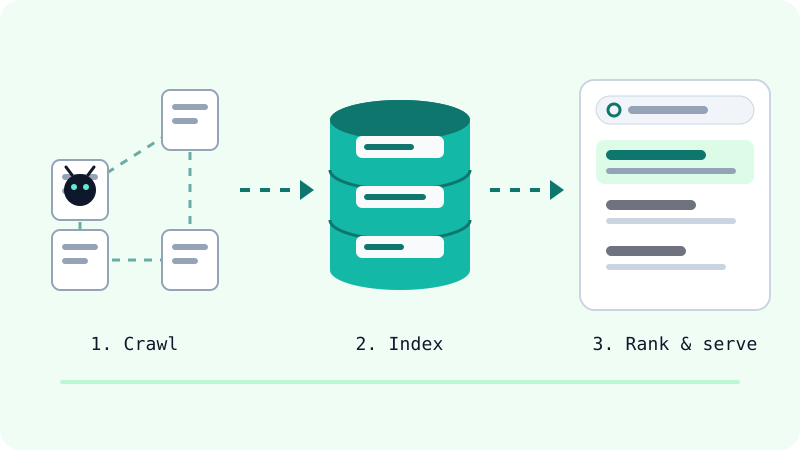
Google describes three stages, and every SEO task fits into one of them:
- Crawling. Automated programs called crawlers follow links and download pages, images and other files. If nothing links to your page and it isn't in a sitemap, it may never be found.
- Indexing. Google analyses the page: the text, titles, images and other signals. It also decides which URL is the main (canonical) version when several pages are similar, then stores the result in its index.
- Serving and ranking. When someone searches, Google picks the indexed pages it thinks are most relevant and useful for that query, taking into account things like language and location.
Two facts worth remembering: Google does not take payment to crawl you more or rank you higher, and it does not guarantee that any page will be crawled, indexed or shown, even when you follow every guideline.
Keyword research without expensive tools
Keyword research simply means learning the words people actually use. You don't need a paid tool to start:
- Google autocomplete: start typing your topic into Google and note the suggestions.
- Related searches and questions that appear on the results page.
- Google Trends to compare which of two phrases is searched more and where.
- Search Console's Performance report, once your site has some traffic. It shows the real queries that brought impressions and clicks to your pages.
Then match each page to one main intent. Someone searching "what is a domain" wants an explanation; someone searching "buy a domain" wants steps. Writing two separate pages for two intents usually works better than one page trying to do both.
On-page SEO: what to get right on every page
These are the basics Google lists in its own SEO starter guide:
| Element | What good looks like |
|---|---|
<title> |
Unique for each page, clear and descriptive. No keyword stuffing. Google may rewrite it if it doesn't describe the page well. |
| Meta description | A short, unique summary of the page. Google may show it as the snippet, or pick text from the page instead. |
| Headings | One <h1> for the topic, then <h2> and <h3> to organise sections. This helps readers and screen readers; heading order itself isn't a ranking trick. |
| Internal links | Link related pages together with descriptive link text, not "click here". |
| Images | Descriptive alt text, sensible file names, and compressed files. |
| URLs | Short and readable, such as /seo-basics/ rather than /p?id=8271. |
A simple example of a page head:
<title>How to Buy a Domain on Namecheap: Step-by-Step Guide</title>
<meta name="description" content="Choose, buy and set up your first domain on Namecheap, with tips on privacy, renewals and DNS.">
If you're still putting your first site together, our guide to building a website from scratch covers the HTML structure these tags live in.
Technical basics: sitemap, robots.txt, HTTPS, speed and mobile
You don't need to be a developer, but you should know these five things:
- Sitemap. An XML file listing the URLs you want found, using full absolute URLs. A sitemap helps discovery but doesn't guarantee indexing. Small, well-linked sites may not strictly need one, yet most sites benefit.
- robots.txt. A file at the root of your site that tells crawlers which URLs they may crawl. It is not a way to hide a page from Google: a blocked page can still be indexed if other sites link to it. To keep a page out of results, use a
noindextag or password protection. - HTTPS. Serve every page securely. Most modern hosts give you a free certificate.
- Speed and Core Web Vitals. Google measures real-user experience with three metrics. Good scores are LCP (loading) within 2.5 seconds, INP (responsiveness) under 200 milliseconds, and CLS (visual stability) under 0.1.
- Mobile. Google uses the mobile version of your content for indexing and ranking, and recommends responsive design.
A minimal robots.txt that allows everything and points to your sitemap:
User-agent: *
Allow: /

Sitemap: https://example.com/sitemap.xml
Keep expectations realistic: Google says relevance comes first, and good Core Web Vitals scores alone don't guarantee top rankings. Speed helps most when several pages are equally useful.
Content quality: write for people first
Google's guidance on helpful content asks simple questions. Would your audience find the page useful if they came to it directly? Does it show first-hand experience or real knowledge? Will the reader leave having achieved their goal?
Warning signs of "search-engine-first" content include:
- Publishing lots of pages on unrelated topics just to catch traffic.
- Mainly summarising what others wrote without adding anything.
- Writing to a target word count. Google says there is no ideal length.
- Using AI or automation to mass-produce pages mainly to manipulate rankings, which breaks Google's spam policies.
Update older articles when facts change, and fix or remove thin pages rather than piling up more of them.
Structured data basics
Structured data is code that describes your page in a standard vocabulary (schema.org), for example "this is an article, written by this person, published on this date". Google recommends the JSON-LD format:
<script type="application/ld+json">
{
  "@context": "https://schema.org",
  "@type": "Article",
  "headline": "SEO Basics for Beginners",
  "datePublished": "2026-10-01"
}
</script>
Structured data can make a page eligible for rich results, but it never guarantees them. Test your markup with Google's Rich Results Test, and only mark up content that is visible on the page. Note that FAQ rich results are no longer a realistic goal for ordinary sites, so don't add FAQ markup expecting extra space in Google.
AI answer engines: write answers people can quote
AI Overviews in Google and chat-style assistants increasingly answer questions directly. Google says there's no special file, markup or trick needed for its AI features; pages simply need to be indexed and eligible for a snippet. What helps is good writing:
- Answer the main question in the first two or three sentences, then go into detail.
- Use clear headings that match real questions.
- Add a short FAQ for the follow-up questions readers ask.
- State facts precisely and keep them up to date.
Measure, fix and keep going
You can't improve what you can't see. Set up Google Search Console to submit your sitemap, check which pages are indexed and see the queries that bring visitors. Review it every few weeks, improve pages that get impressions but few clicks, and keep publishing.
SEO is slow, steady work, and nobody can honestly promise you a ranking. But helpful, well-structured pages on a healthy site tend to earn traffic over time. If you plan to monetise that traffic later, read our realistic guide to making money with Google AdSense.
Official sources: Google Search Central: SEO Starter Guide · How Google Search works · Creating helpful content
Frequently asked questions
How long does SEO take to show results?
There is no fixed timeline. A new page can be crawled within days, but building steady search traffic for a new site usually takes months of publishing useful content. Anyone who promises a specific ranking by a specific date is guessing.
Can I pay Google to rank higher in the free results?
No. Google states that it does not accept payment to crawl a site more often or to rank it higher. Paid ads are a separate product, shown with an ad label, and buying them doesn't change your free rankings.
Does the meta keywords tag still matter?
Not for Google. Google Search ignores the meta keywords tag completely. Spend that time on a clear title, a useful meta description and good content instead.
Do I need special SEO for AI Overviews and AI chat answers?
Google says there are no extra requirements or special files needed to appear in its AI features. A page has to be indexed and eligible to show a snippet, so the normal SEO basics in this guide are what count.
Is it bad to have pages that return 404?
Not by itself. Google says 404 errors don't harm your site's indexing or ranking. Fix them when you link to the missing page yourself, and add a redirect if the content simply moved to a new address.
Related tutorials
Websites & hosting
Google Search Console Step by Step: Setup, Sitemap and Indexing
Set up Google Search Console: add a domain, verify with a DNS TXT record, submit a sitemap, request indexing and read the Pages and Performance reports.
· 7 min read
Websites & hosting
How to Build Your Own Website from Scratch with No Experience
A beginner's step-by-step guide to building your first website with HTML and CSS, testing it on your computer, and publishing it online for free.
· 5 min read
Websites & hosting
How to Connect Your Domain to Cloudflare Pages (Step by Step)
Connect a Namecheap domain to a Cloudflare Pages site: add the site to Cloudflare, switch nameservers, attach the custom domain and redirect www.
· 6 min read