What Is an API? A Simple Explanation with Examples
An API lets two programs talk to each other. Learn how APIs work, what requests, responses, and JSON mean, and call a real API yourself in a few minutes.
Published 6 min read
In this article
An API (Application Programming Interface) is a set of rules that lets one program ask another program for data or ask it to do something. Your weather app, for example, doesn't measure the temperature itself: it sends a request to a weather service's API and gets the forecast back as data. APIs are how apps, websites, and services talk to each other.
In short: an app sends a request to an API address, the server does the work, and it sends back a response, usually in JSON format.
A simple analogy: the waiter
Imagine a restaurant:
- You are the app that wants something.
- The kitchen is the server with the data and the logic.
- The waiter is the API.
You don't walk into the kitchen and cook. You choose from a menu, the waiter takes your order to the kitchen, and brings back your food. The menu is like the API's documentation: it lists what you can ask for and how to ask. The kitchen can change its equipment completely, and as long as the menu stays the same, you order exactly as before.
That is the real value of an API: each side can change its internals without breaking the other.
How an API request works
Most web APIs work over HTTP, the same protocol your browser uses. A request usually has:
- An endpoint: the address you call, such as
https://api.example.com/weather. - A method: what you want to do, for example
GETto read data. - Parameters: extra details, like
?city=Riyadh. - Headers: information about the request, such as an API key that identifies you.
- A body (sometimes): data you send, for example when creating something new.
The server answers with a status code that says whether it worked, and usually a body of data in JSON, a simple text format of names and values:
{
  "city": "Riyadh",
  "temp": 31,
  "unit": "C"
}
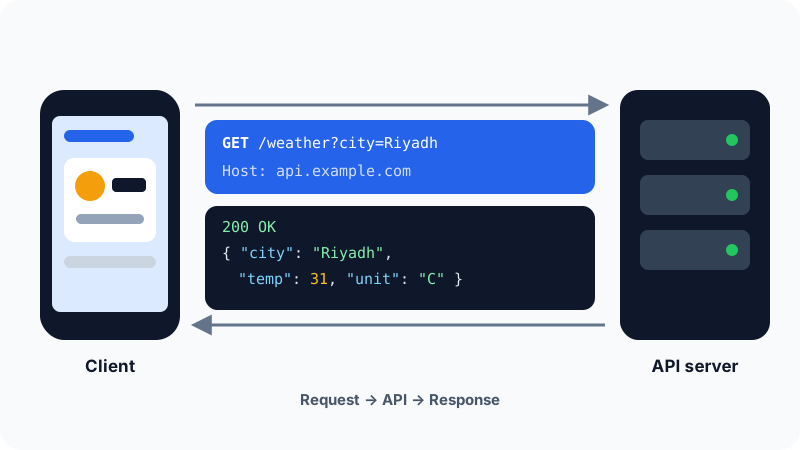
This example uses a made-up weather API at example.com to show the shape of a request. The real address and fields depend on the service you use.
Examples of APIs you already use
You rely on APIs many times a day without noticing:
- Signing in with Google or Apple on another site uses their sign-in APIs.
- Weather and map widgets inside apps pull data from weather and mapping APIs.
- Online payments in stores usually go through a payment provider's API.
- Travel sites that compare flights or hotels collect prices from many providers' APIs.
- AI features in many apps send your text to an AI model through an API and show you the answer.
Even your own website probably talks to an API: the frontend and backend of a web app communicate through one.
HTTP methods and status codes
REST APIs, the most common style, use HTTP methods to describe the action:
| Method | Meaning | Example |
|---|---|---|
GET |
Read data | Get a list of products |
POST |
Create something new | Create a new order |
PUT / PATCH |
Update existing data | Change a delivery address |
DELETE |
Remove data | Cancel a saved item |
And status codes tell you what happened:
| Code | Meaning |
|---|---|
200 OK |
Success |
201 Created |
Something new was created |
400 Bad Request |
Your request has a mistake |
401 Unauthorized |
Missing or invalid credentials, such as an API key |
404 Not Found |
The resource doesn't exist |
429 Too Many Requests |
You hit the rate limit; slow down |
500 Internal Server Error |
Something broke on the server side |
A quick rule: codes starting with 2 mean success, 4 means a problem with your request, and 5 means a problem on the server.
Try a real API in one minute
GitHub has a public API that you can call without an account for basic information (with a limited number of requests per hour). Open a terminal and run:
curl https://api.github.com/users/octocat
You'll get back JSON describing GitHub's demo account. Here is a shortened part of it:
{
  "login": "octocat",
  "name": "The Octocat",
  "html_url": "https://github.com/octocat",
  ...
}
You can also paste the same URL into your browser's address bar and see the raw JSON.
Calling an API from code
Here is the same request in JavaScript, which you can paste as-is into your browser's developer console:
const response = await fetch("https://api.github.com/users/octocat");
const user = await response.json();
console.log(user.name);
And in Python with the popular requests library (install it with pip install requests):
import requests

response = requests.get("https://api.github.com/users/octocat")
user = response.json()
print(user["name"])
Both print The Octocat. The pattern is always the same: send a request, check the status, read the JSON. If you're new to Python, start with our Python for beginners guide first.
Types of APIs you'll hear about
- REST: the most common style, with a clear URL for each resource and HTTP methods like GET and POST. It's what this guide describes.
- GraphQL: you send a query that names exactly the fields you want, so you don't receive extra data.
- Webhooks: instead of asking a server every minute whether anything changed, the server sends a request to your URL automatically when an event happens, such as a successful payment.
- Library and operating system APIs: "API" doesn't always mean the internet. The functions a code library or an operating system offers to your program are also an API.
As a beginner, understanding REST well is enough; most services offer it and most tutorials use it.
API keys and staying safe
Many APIs require an API key, a long secret string that identifies your account and tracks your usage. Treat it like a password:
- Never put an API key in frontend code that runs in the browser; anyone can read it there. Call the API from your backend instead.
- Never commit keys to Git. Keep them in environment variables or a
.envfile that is listed in.gitignore. Our Git and GitHub guide explains how. - Respect rate limits and cache results when you can, so you don't make the same request again and again.
- Revoke and replace a key immediately if you think it has leaked.
Once you understand requests, responses, and JSON, you can read almost any API's documentation and connect it to your own projects.
Frequently asked questions
Is an API the same as a website?
No. A website is made for people and returns pages designed to be read in a browser. An API is made for programs and usually returns raw data, often as JSON, that another app then displays or processes.
Are APIs free to use?
Some are free, some are free up to a limit, and some are paid per request. Most providers publish their limits and prices on a pricing or documentation page, so check it before you build on an API.
What is the difference between REST and GraphQL?
With REST you call different URLs for different resources, and the server decides what data comes back. With GraphQL you usually send queries to a single endpoint and ask for exactly the fields you need. REST is simpler to start with and more common.
Do I need to know programming to use an API?
Not to try one. You can open some APIs directly in a browser or use tools like curl or Postman. To use an API inside an app or automation, basic programming in a language like Python or JavaScript helps a lot.
Related tutorials

Programming
How to Use AI to Help You Code (A Practical Guide for Beginners)
Learn how to use AI assistants like ChatGPT, Claude and GitHub Copilot to write, explain and debug code, plus the mistakes to avoid when coding with AI.
· 6 min read

Programming
Which Programming Language Should You Learn First?
Python or JavaScript? Find the best first programming language for your goal, whether that's websites, data and AI, mobile apps, or games, and how to start.
· 5 min read
Programming
Frontend vs Backend: What's the Difference?
Frontend is what you see in the browser; backend is the server, logic, and database behind it. Learn the difference, the languages, and which path suits you.
· 5 min read