Frontend vs Backend: What's the Difference?
Frontend is what you see in the browser; backend is the server, logic, and database behind it. Learn the difference, the languages, and which path suits you.
Published 5 min read
In this article
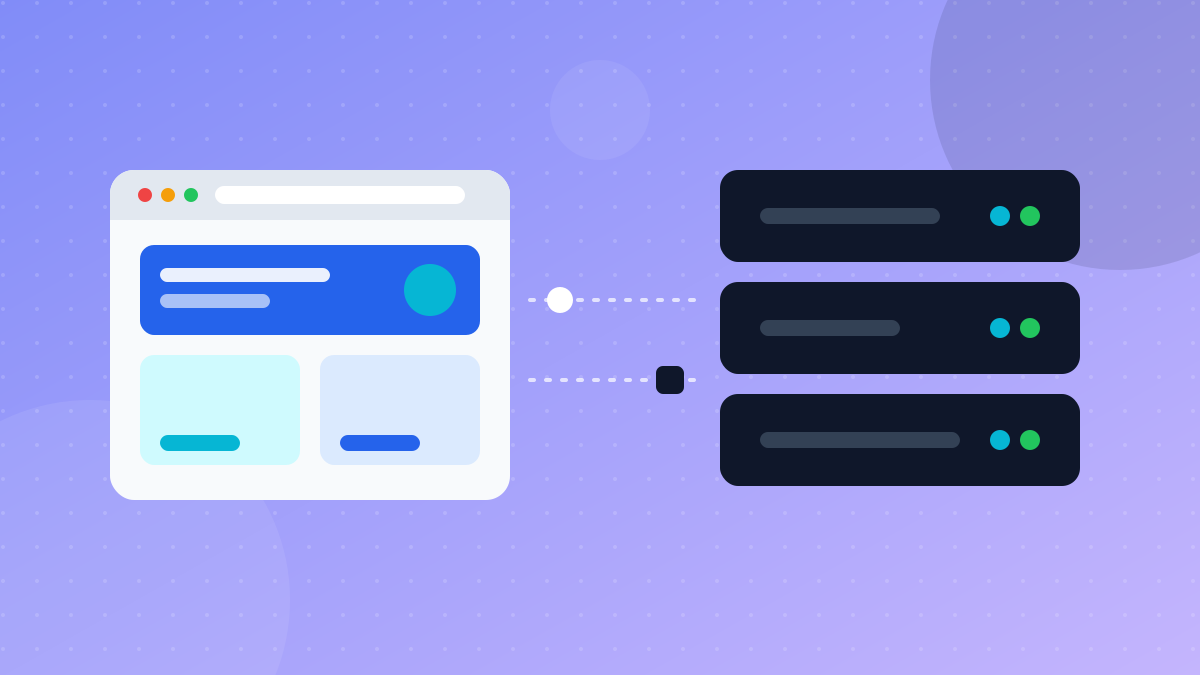
Frontend is the part of a website or app you see and interact with: the layout, buttons, text, and animations running in your browser. Backend is the part you don't see: the server that handles requests, runs the business logic, and reads and writes data in a database. Every time you click something, the frontend asks the backend for data and then shows you the result.
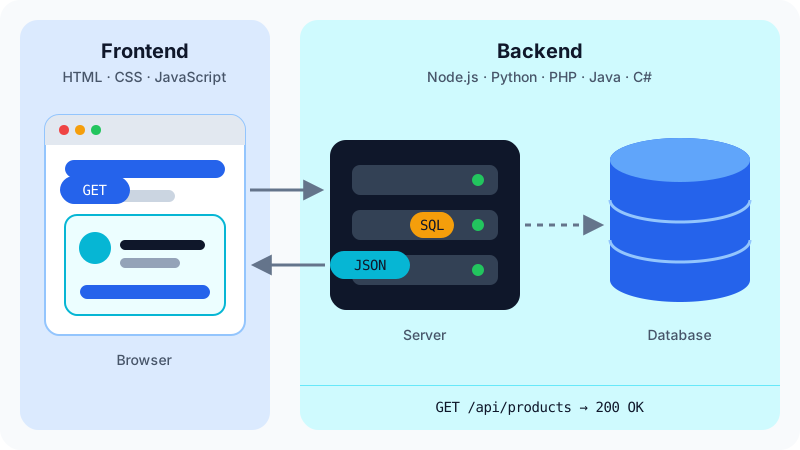
In short: frontend is the interface (HTML, CSS, JavaScript), backend is the server and database (Node.js, Python, PHP, Java, C#, and others), and they talk to each other through an API.
An everyday example: a shopping site
Think about searching for a product on an online store:
- You type "headphones" in the search box and press Enter. The search box, the button, and the page design are frontend.
- The browser sends a request to the store's server.
- The server checks the database for matching products, applies prices and stock rules, and sends back a list. That is the backend.
- The browser receives the list and draws the product cards on the screen. Frontend again.
A restaurant is a useful picture: the dining room, menu, and table setting are the frontend; the kitchen, where orders are actually prepared, is the backend.
What frontend developers do
A frontend developer builds everything the user sees and touches. The core building blocks are:
- HTML for structure: headings, paragraphs, images, forms.
- CSS for style: colours, fonts, spacing, and layouts that adapt to phones and desktops.
- JavaScript for behaviour: reacting to clicks, validating forms, loading data without reloading the page.
On larger projects, developers usually add a framework or library such as React, Vue, or Angular to organise the interface into reusable components.
Typical frontend concerns include responsive design, accessibility (making the site usable with a keyboard or screen reader), page speed, and making sure the site works across different browsers.
What backend developers do
A backend developer builds the logic and data layer. Common tasks include:
- Creating APIs that the frontend (or a mobile app) calls to get or send data.
- Handling user accounts: sign-up, login, passwords, and permissions.
- Working with databases such as PostgreSQL, MySQL, or MongoDB.
- Processing things like payments, emails, file uploads, and scheduled jobs.
- Keeping the system secure and able to handle many users at once.
There are many backend languages, each with popular frameworks: JavaScript with Node.js (for example Express), Python with Django or Flask, PHP with Laravel, Java with Spring, and C# with ASP.NET Core. Go is another common choice for fast network services.
How the frontend and backend talk
The two sides communicate over HTTP, usually through an API. The frontend sends a request such as GET /api/products, the backend queries the database, and it answers with data, often in JSON format. The frontend then turns that data into something you can see.
If APIs are new to you, read our simple explanation of what an API is. It is the glue between the two worlds.
Frontend vs backend at a glance
| Frontend | Backend | |
|---|---|---|
| Runs on | The user's browser or device | A server |
| Main languages | HTML, CSS, JavaScript (and TypeScript) | JavaScript (Node.js), Python, PHP, Java, C#, Go, and more |
| Popular tools | React, Vue, Angular | Express, Django, Laravel, Spring, ASP.NET Core |
| Works with | Layout, design, user interaction | Data, logic, security, performance |
| You see results | Instantly, on screen | Through API responses, logs, and tests |
| Typical worries | Browser differences, screen sizes, accessibility | Data safety, scaling, uptime |
Skills both sides share
Whichever side you choose, some skills are the same for every web developer:
- Git and GitHub to track changes and work with a team.
- The browser's developer tools (press
F12in most browsers) to inspect pages, read errors in the console, and watch network requests travel between frontend and backend. - HTTP and APIs: frontend developers call APIs, backend developers build them, so both need to understand requests, responses, and status codes.
- The command line for running projects, installing packages, and using tools.
- Basic security habits, such as never trusting user input and never exposing passwords or API keys.
What about full stack?
A full stack developer works on both sides. This is common in small teams and startups, and it is a natural goal if you want to build complete projects on your own. JavaScript is popular for this path because the same language runs in the browser and, with Node.js, on the server.
Most people still start by getting comfortable on one side first. Trying to learn everything at once is a common reason beginners feel overwhelmed.
Which one should you learn first?
Ask yourself what kind of problems you enjoy:
- Choose frontend if you like visual work, design details, and seeing your changes immediately.
- Choose backend if you prefer logic, data, puzzles, and systems that work behind the scenes.
- Not sure? Start with HTML, CSS, and basic JavaScript. Every web developer needs them, and you will quickly discover whether you enjoy the interface or want to dig into the server.
A good first project for either path is a small to-do list app: build the page first, then add a simple backend that saves the tasks. You will touch both sides and understand how they fit together.
Remember that your first choice isn't permanent. Plenty of developers start on the frontend and move to the backend, or the other way round, because the fundamentals (logical thinking, problem solving, reading errors) are the same on both sides.
For a broader roadmap, see how to start learning programming from scratch and our guide on which programming language to learn first. When you are ready to put something online, building your own website from scratch walks you through it.
Frequently asked questions
Which is easier for a beginner, frontend or backend?
Frontend usually feels easier at first because you see the result of every change in the browser right away. Backend is less visual but not harder in principle. Pick the one whose problems you enjoy solving.
Can JavaScript be used for both frontend and backend?
Yes. JavaScript runs in every browser, and with Node.js it also runs on servers. That is why many beginners start with JavaScript: one language covers both sides.
What is a full stack developer?
A full stack developer can work on both the frontend and the backend of an application. In practice most full stack developers are stronger on one side, but they understand enough of the other to build a complete feature.
Do I need a backend for a simple website?
Not always. A portfolio, blog, or landing page can be a static site made of HTML, CSS, and JavaScript files. You need a backend when users log in, submit data that must be stored, or see content that changes per user.
Related tutorials
Programming
How to Use AI to Help You Code (A Practical Guide for Beginners)
Learn how to use AI assistants like ChatGPT, Claude and GitHub Copilot to write, explain and debug code, plus the mistakes to avoid when coding with AI.
· 6 min read
Programming
Which Programming Language Should You Learn First?
Python or JavaScript? Find the best first programming language for your goal, whether that's websites, data and AI, mobile apps, or games, and how to start.
· 5 min read
Programming
Git and GitHub for Beginners: A Step-by-Step Guide
Learn Git and GitHub from zero: install Git, make your first commit, push your project to GitHub, and use branches safely, with every command explained.
· 6 min read