How to Learn a Language with ChatGPT and Other AI: Practical Prompts
Use ChatGPT and other AI chatbots to practise conversation, get your mistakes corrected and build vocabulary, with ready-to-copy prompts and honest limits.
Published 5 min read
In this article
You can use ChatGPT, or similar assistants like Claude and Gemini, as a language practice partner: chat or talk with it in the language you are learning, ask it to correct your mistakes and explain them, and have it build vocabulary lists and quizzes for your level. The key is to tell it your level and exactly what kind of help you want.
In short: start every session by stating your level, your goal and how you want corrections, practise in short daily sessions, and double-check anything important, because AI can sound confident and still be wrong.
Why AI is a useful practice partner
Most learners don't get enough practice. Classes are limited, and speaking with native speakers can feel intimidating. An AI chatbot fills that gap:
- It is available at any time and never gets tired of your questions.
- It adapts to your level if you ask it to.
- It can switch between explaining in your native language and practising in the target language.
- You can make mistakes without feeling embarrassed.
What it doesn't replace: real conversations with people, and reliable references such as a good dictionary.
Set the scene before you start
A short setup message makes every answer more useful. Copy this, fill in the brackets, and send it at the start of a new chat:
I'm learning English. My level is about B1 (intermediate).
My native language is Arabic. My goal is to speak confidently
at work. In this chat:
- Use simple, natural English suitable for my level.
- Correct my mistakes after each message, briefly.
- If I write a word in Arabic, give me the English word.
Levels like A1 to C2 come from the Common European Framework (CEFR). If you don't know yours, just say "beginner", "intermediate" or "advanced". For more ideas on writing clear instructions, read how to write good prompts.
Conversation practice prompts
Role-play is one of the most effective exercises. Pick a situation you will actually face:
Let's role-play. You are a hotel receptionist and I'm a guest
checking in. Ask me one question at a time and wait for my reply.
Keep your sentences short. After 8 exchanges, stop and give me
feedback on my three most important mistakes.
Other useful scenarios:
Interview me for a customer service job in English. Ask one
question at a time, then rate my answer and suggest a better version.

Let's chat casually about films. Ask me follow-up questions
so I have to explain my opinions.
If constant corrections break the flow of a conversation, change the rule: ask it to note your mistakes silently and give you all the feedback at the end. That feels much closer to a real conversation.
If you use the mobile app, try the voice conversation mode: you speak, it replies out loud. This builds fluency and listening speed. Keep in mind that it may understand you even when your pronunciation isn't clear, so for accent work, add the tools in our guide to improving your English pronunciation.
Getting your mistakes corrected
Correction is where AI shines, as long as you ask for explanations, not just a fixed text.
Correct this paragraph. Then list each mistake in a table with
three columns: my version, the correct version, and a short
explanation in simple English. Don't change my style more than needed.

[paste your paragraph]
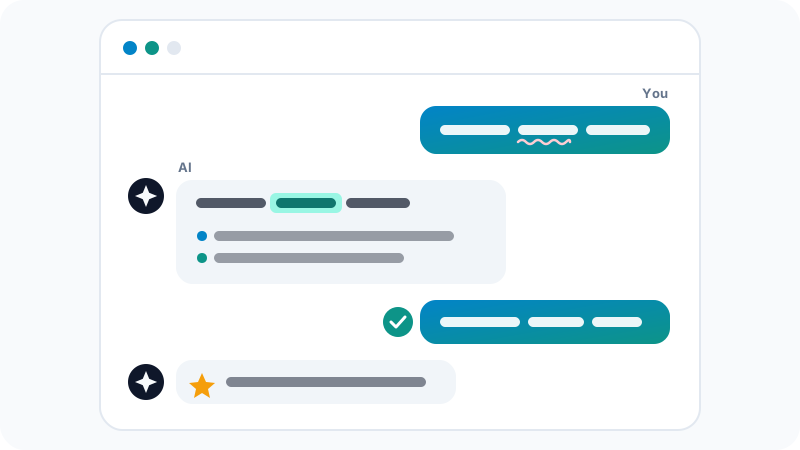
The best loop looks like the diagram: you write, the AI highlights and explains the mistake, and you write the sentence again yourself. Rewriting it is what makes the correction stick. You can also ask:
Which of my mistakes today were repeated? Give me 5 short exercises
to practise that grammar point.
Building vocabulary
Ask for words you will really use, always with examples:
Give me 10 useful words for talking about my job as an accountant,
at B1 level. For each: the word, a simple definition, and one
example sentence. Then quiz me on them one by one.
A few more ideas:
- Collocations: "Which verbs go naturally with 'decision', 'mistake' and 'progress'?"
- Differences: "Explain the difference between 'look', 'see' and 'watch' with examples."
- Flashcards: "Turn these 10 words into two columns, front and back, separated by a semicolon, so I can save them as a text file and import them into Anki."
Anki and other apps that help you review words are covered in our guide to the best apps to learn English.
Understanding grammar
Ask for short explanations, your level, and examples from your life:
Explain the difference between the present perfect and the past
simple in simple English. Use 3 examples about work and travel,
then give me 5 fill-in-the-blank sentences to check.
If an explanation is confusing, ask it to explain again in your native language, or to "explain it like I'm 12".
Limits: where AI gets it wrong
AI is a powerful tool, but it is not an authority on language:
- It can make mistakes. It occasionally "corrects" something that was already right, or explains a rule wrongly. If something surprises you, check it in a trusted dictionary or grammar resource.
- It can be too formal or too perfect. Ask for "casual, spoken English" when you want natural conversation.
- Quality varies by language. Widely used languages get better results than rare ones.
- Pronunciation feedback is limited. Treat voice chats as fluency practice, not a pronunciation test.
- Privacy: don't paste private messages, work documents or personal data just to practise. Write your own examples instead.
Other assistants, such as Claude and Gemini, work with the same prompts. If you are new to AI chat tools, start with our guide to ChatGPT for beginners, which also covers its privacy settings.
A simple 20-minute daily routine
- 5 minutes: review yesterday's corrected sentences and new words.
- 10 minutes: one role-play or casual chat, in text or voice.
- 5 minutes: ask for feedback on your top mistakes and rewrite those sentences yourself.
Keep a simple notebook or document of your corrections. After a few weeks, you will see which mistakes keep coming back, and that list is exactly what to practise next.
Frequently asked questions
Can ChatGPT replace a language teacher?
Not completely. It is a patient, always-available practice partner, but it can make mistakes and it won't plan a full course or keep you accountable the way a good teacher does. It works best alongside a course, an app or a teacher.
Can I practise speaking out loud with AI?
Yes. The ChatGPT mobile app and several other AI apps offer voice conversations, so you can talk and hear replies. They are good for fluency practice, but don't rely on them for detailed pronunciation feedback, since they may miss or misjudge sounds.
Is the free version of ChatGPT enough for language practice?
For text-based practice, the free version is usually enough. You may hit message limits in long sessions, and some features such as extended voice use can be limited on the free plan.
Does this work for languages other than English?
Yes. The same prompts work for Spanish, French, German, Arabic and many other widely used languages. Quality is usually lower for less common languages, so double-check more in those cases.
Related tutorials
Language learning
Best Free Translation Tools: Google Translate, DeepL, Microsoft Translator and AI
Compare Google Translate, DeepL, Microsoft Translator and AI chatbots, with tips for more accurate translations and for keeping private text safe.
· 5 min read
Language learning
IELTS vs TOEFL vs Duolingo English Test: Which One Should You Take?
Compare IELTS, TOEFL and the Duolingo English Test: format, speaking section, scoring, who usually accepts each one, and how to prepare for the test you choose.
· 6 min read
Language learning
How to Improve Your English Pronunciation with Free Online Tools
Improve your English pronunciation for free with dictionary audio, phonetic symbols, shadowing, recording yourself, YouGlish and AI voice practice.
· 6 min read