How to Write Good AI Prompts (With Practical Examples)
Learn to write clear prompts for ChatGPT, Claude and Gemini: the parts of a good request, before-and-after examples, templates and common mistakes.
Published 6 min read
In this article
A prompt is the request you type to an AI assistant, and a good prompt spells out the task, the context and the shape of the result in simple, specific words. The clearer you are about your goal, the closer the first answer will be to what you actually want.
In short: set the role and task, add the context that matters, ask for a specific format, include an example if you can, then refine the result with short follow-up requests.
Why the wording matters
The assistant knows nothing about you except what you type. When you write "write a post about coffee", it has to guess: for which platform? For whom? In what tone? How long? Every wrong guess gives you a generic answer that doesn't fit.
A good prompt doesn't need magic words. It's the same way you would brief a smart new colleague who doesn't know the details of your work.
This skill isn't tied to any one tool. The same principles work with ChatGPT, Claude and Gemini, and with image generators too. Even if the tools change next year, your ability to explain clearly what you want is what makes the difference.
The five parts of a good prompt
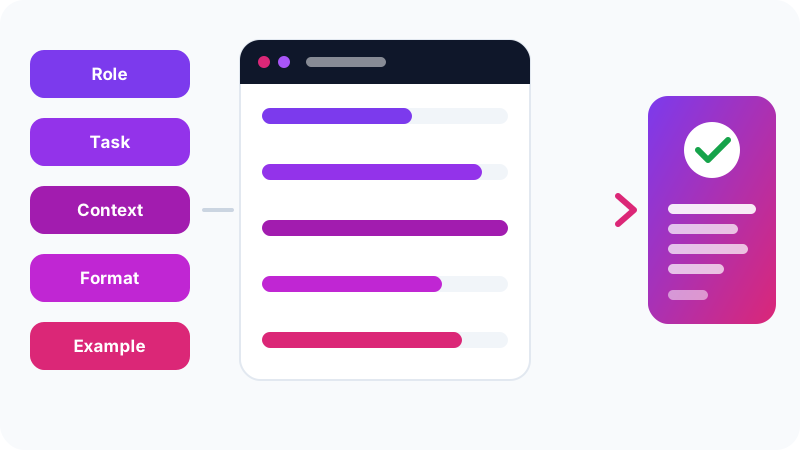
You won't need all five every time, but treat them as a checklist:
- Role: who should the assistant be? For example, "You are a maths teacher for 12-year-olds."
- Task: what exactly do you want? Use a clear verb: write, summarise, compare, fix, explain.
- Context: things the assistant can't know: the audience, the goal, the constraints, what you've already tried.
- Format: a table, bullet points, a paragraph, a word count, the language of the reply.
- Example: a small sample of what you want, if you have one.
A worked example: from weak to strong
Weak:
Write a post about coffee.

Strong:
You write content for a small café in Riyadh.
Write an Instagram post announcing a new speciality coffee from Ethiopia.
Audience: young people who like trying new flavours.
Tone: friendly and short, no hype.
Format: 3 lines maximum, then one line with 3 hashtags.
The strong version is a little longer, but it saves you several rounds of edits.
Look at exactly what changed:
- The role sets a tone that fits a café, not a big corporation.
- The task is now specific: announcing one product on one platform.
- The audience guides word choice and style.
- The format stops a long answer that wouldn't work on Instagram.
Say what you don't want, too
Negative constraints help a lot when you already know what bothers you about typical answers. For example:
- "Don't use technical jargon."
- "Don't open with a long greeting."
- "Don't add information that isn't in the text I sent."
That last one matters most for summaries and translations, because it reduces the chance the assistant adds details of its own.
Show examples instead of describing
Sometimes a style is hard to describe and easier to show. This is often called "few-shot" prompting:
Turn product names into short descriptions in this exact style:

Product: Wireless earbuds
Description: Clear sound that stays with you all day, no cables.

Product: Laptop backpack
Description:
The assistant will continue with roughly the same length and tone. This works very well with image generators too, as we show in the best free AI image generators.
Break big tasks into steps
One huge request in a single message usually produces a shallow answer. Instead of "write me a complete marketing plan", try:
- "Ask me 5 questions about my business before you start."
- "Now suggest 3 possible customer segments."
- "Write a one-month plan for the first segment as a table."
That first step is especially useful: when you ask the assistant to question you first, it collects the context you forgot to give.
For problems that need reasoning, like maths or comparisons, ask it to show the steps. That makes it easier for you to spot a mistake in the logic.
Refine with follow-ups
The first answer is rarely perfect, and that's normal. The chat remembers what came before, so use short requests to adjust:
- "Cut it by half."
- "Rewrite it in a less formal tone."
- "The second paragraph is wrong, because..."
- "Give me 3 different alternatives for the headline."
If the conversation drifts far from your goal, start a new chat with one prompt that includes everything you learned from the first attempt.
Save your standing instructions instead of repeating them
If you keep typing the same intro in every chat, like "I'm a secondary-school teacher and I prefer short answers", there's a better way. The major assistants have a place in settings where you describe yourself and how you like replies, and the assistant takes it into account automatically in every new chat.
What's worth writing there?
- Your job or studies, briefly.
- Your preferred reply language.
- Your preferred answer length: concise or detailed.
- Things to avoid, such as long intros or lots of emoji.
Some assistants also let you create workspaces or projects with their own instructions, for example one for work and one for study. Don't put sensitive data in these settings; include only what helps improve the replies.
Ready-to-use templates
Copy a template and replace the brackets with your details:
[Summary]
Summarise the text below in 5 bullet points for a [role/level].
Focus on [what matters to you] and keep any key numbers or dates.
Text: [paste text]

[Explanation]
Explain [concept] to a [beginner/high-school student] using an
everyday example, then ask me two questions to check I understood.

[Message]
Write an [email/WhatsApp message] to [person] about [topic].
Tone: [formal/friendly]. Length: under [number] words.

[Proofreading]
Proofread the text below. Fix only spelling and grammar,
keep my style, then list the changes you made.
If you're working on your CV, you'll find dedicated prompts in using AI to write and improve your CV.
Common mistakes that weaken answers
- Vagueness: "improve this text" without saying how: shorter, clearer, more persuasive?
- Conflicting requests: "very detailed, in two lines".
- Forgetting the audience: an explanation for a child and for an engineer shouldn't be the same.
- Blind trust: a good prompt improves the answer but doesn't guarantee it's correct, so check important facts.
- Sharing sensitive data: don't paste passwords or personal details to get a "more accurate" answer.
If you're just getting started, begin with our ChatGPT beginner's guide, then try these templates on a real task today.
Frequently asked questions
Should I write prompts in English or in my own language?
In most cases, write in the language you want the answer in. Modern assistants handle many languages well, and if you want the reply in a different language from your question, say so at the end of the prompt.
Is a longer prompt always better?
No. What matters is that it contains the necessary information: the task, the context and the format. Padding and repetition can distract the model, and a short clear prompt beats a long vague one.
Do I need to buy ready-made prompts?
No. Simple free templates like the ones in this article, adapted to your situation, work better than a generic prompt written for someone else.
Does the same prompt work on every assistant?
Mostly, yes, because the principles of a clear request are the same. Results do differ a little between ChatGPT, Claude and Gemini, so test and adjust.
Related tutorials
AI tools
How to Use AI to Write and Improve Your CV (Step by Step)
A practical way to use ChatGPT, Claude and Gemini to write your CV, tailor it to a job ad and pass ATS filters, with ready-to-use prompts and mistakes to avoid.
· 6 min read
AI tools
ChatGPT for Beginners: Everything You Need to Know to Get Started
A plain guide to ChatGPT: what it is, how to sign up and start your first chat, free vs paid plans, and how to use it safely and get better answers.
· 6 min read
AI tools
ChatGPT vs Claude vs Gemini: Which One Fits Your Work?
A practical comparison of ChatGPT, Claude and Gemini: what each does best, free and paid plans, and which one to pick for study, writing or coding.
· 6 min read