ChatGPT vs Claude vs Gemini: Which One Fits Your Work?
A practical comparison of ChatGPT, Claude and Gemini: what each does best, free and paid plans, and which one to pick for study, writing or coding.
Published 6 min read
In this article
ChatGPT, Claude and Gemini are the three best-known AI assistants, and all three are very good at everyday tasks like writing, explaining and summarising. The real differences are in the details: ChatGPT has the broadest feature set, Claude is strong at long-form writing, documents and code, and Gemini is the most tightly connected to Google services like Gmail and Drive.
In short: if you're new, start with any of them for free. Pick ChatGPT for variety, Claude for long text and files, and Gemini if your work lives in Google's apps.
A quick look at the three
- ChatGPT: made by OpenAI, the product that made this kind of assistant mainstream. Available on the web, mobile and desktop.
- Claude: made by Anthropic, a company with a strong focus on safety and writing quality. Also available on the web, mobile and desktop.
- Gemini: made by Google, tied to your Google account and services, and the built-in assistant on many Android phones.
All three are built on large language models, handle many languages, accept file and image uploads, and offer a free plan plus paid plans.
Some features are now common to all three, so don't let them drive your choice:
- Web search for questions about recent events.
- Reading PDFs and images and answering questions about them.
- Writing and explaining code in popular programming languages.
- A deep research mode that gathers information from many sources and writes a report.
The differences show up in how well each one does these things and in the extras around the chat, which is what the next sections cover.
Comparison table
| ChatGPT | Claude | Gemini | |
|---|---|---|---|
| Company | OpenAI | Anthropic | |
| Free plan | Yes, with limits | Yes, with limits | Yes, with limits |
| Main paid plan | Usually around $20/month | Usually around $20/month | Usually similar, bundled in a Google plan with extra storage |
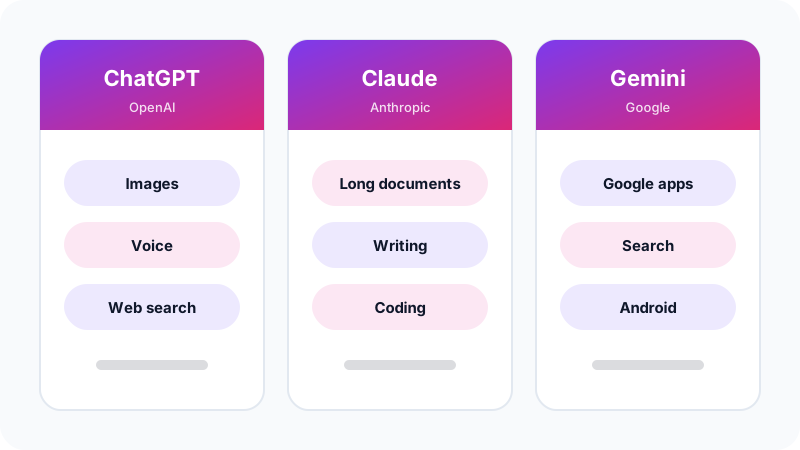
| Known for | Breadth: images, voice, search | Long writing, documents, coding | Google integration |
| Image generation | Yes | Not a focus | Yes |
Prices and limits change often and can differ by country, so check each service's official pricing page before you subscribe.
ChatGPT: the all-rounder
ChatGPT is the Swiss Army knife of the group. In one place you get:
- Text chat with web search.
- Image generation and editing from a text description.
- Natural voice conversations, handy for language practice or thinking out loud.
- Custom versions of ChatGPT that people build for specific tasks.
It's a great choice if you want one tool that covers most of your needs. If you're just starting, read our ChatGPT beginner's guide.
Claude: long writing, documents and code
Many users find Claude's writing natural and well organised, and it follows long, detailed instructions closely. What stands out:
- Long documents: it can read large files and answer questions about them.
- Projects: you keep your files and instructions in one place, and Claude uses them in every chat inside that project.
- Coding: it has a strong reputation among developers for writing and explaining code.
- A side panel for content: long documents and code open in a separate panel next to the chat, which makes editing easier.
On the other hand, image generation isn't Claude's focus. We cover it in depth in our Claude guide.
Gemini: closest to Google's services
Gemini's main strength is that it lives inside Google's world:
- With your permission, it can reach Gmail, Google Drive and other services, so you can ask about an old email or a file in your account.
- It's built into Google Workspace apps like Docs and Sheets, depending on your plan.
- It's the assistant on many Android phones.
- It draws on Google Search to answer questions about recent events.
If your day runs through Gmail and Drive, Gemini can save you time the others can't. Before you give it access to your email and files, check your account's privacy settings so you know exactly what it can read, and remember you can revoke that access at any time.
What about languages other than English?
All three handle major languages well, including Arabic, and understand many dialects. The gaps between them shift with every update, so don't rely on a fixed verdict. A better method:
- Send the same request, in your language, to all three.
- Compare tone, accuracy and grammar.
- Use the best one for the kind of task you care about. The winner for writing an article may differ from the winner for translating technical text.
How to choose based on your work
| If you are... | Try first | Why |
|---|---|---|
| A student | Any of them | All are strong at explaining, summarising and making practice questions |
| A writer or creator | Claude or ChatGPT | Writing quality and range of styles |
| A designer, or you need images | ChatGPT or Gemini | Image generation is built in |
| A developer | Claude or ChatGPT | Strong at writing and explaining code |
| Living in Gmail and Drive | Gemini | Works with your Google account |
For developers in particular, read how to use AI to help you code.
A hands-on test: compare them yourself in 15 minutes
The best comparison is the one you run on your own real tasks. Open all three in side-by-side tabs and send each the same requests:
1) Write a formal email apologising to a client for a two-day delivery delay, in 100 words.
2) Explain simple vs compound interest with a numeric example, for a high-school student.
3) Summarise this text in 5 bullet points: [paste something from your work or studies]
4) Suggest names for an online perfume shop, with a reason for each name.
Then score each answer on:
- Accuracy: is there a wrong fact or number?
- Following instructions: did it respect the length, format and audience?
- Language quality: does it read naturally and correctly?
- Practical value: can you use it as is, or does it need heavy editing?
You'll usually find that each assistant wins at one task and trails at another, which is exactly what you need to know.
Do you need a paid plan?
At first, probably not. The free plans are enough to try all three and find the one that suits you. Consider paying only when:
- You hit the free message limits regularly.
- You need to upload many or very long files.
- You need an advanced feature that isn't available for free.
Then subscribe to one assistant only: the one you use most. And remember that the quality of an answer depends on how you ask as much as on the tool, so learning to write good prompts improves your results whichever assistant you pick.
Frequently asked questions
Can I use all three for free at the same time?
Yes. Each has its own free plan and nothing stops you from having an account on all three. Many people use more than one and compare answers for important tasks.
Which assistant gives the most accurate answers?
There is no permanent winner. All three companies update their models often and the ranking shifts between releases. The reliable approach is to try the same question on more than one and verify important facts yourself.
Are my conversations private?
Each company has its own privacy policy and its own settings for saving chats and using them for training. Check the privacy settings in each service and avoid sharing sensitive data in any of them.
Do I need to pay for all three?
Almost certainly not. If you need a paid plan, choose the assistant you use most and keep hitting the free limits on, and stay on the free tier for the others.
Related tutorials
AI tools
How to Use AI to Write and Improve Your CV (Step by Step)
A practical way to use ChatGPT, Claude and Gemini to write your CV, tailor it to a job ad and pass ATS filters, with ready-to-use prompts and mistakes to avoid.
· 6 min read

AI tools
ChatGPT for Beginners: Everything You Need to Know to Get Started
A plain guide to ChatGPT: what it is, how to sign up and start your first chat, free vs paid plans, and how to use it safely and get better answers.
· 6 min read
AI tools
Claude AI Guide: Features and How It Differs from ChatGPT
A practical guide to Claude by Anthropic: how to get started, key features like Projects, Artifacts and file analysis, and how it compares to ChatGPT.
· 6 min read