How to Improve Your English Pronunciation with Free Online Tools
Improve your English pronunciation for free with dictionary audio, phonetic symbols, shadowing, recording yourself, YouGlish and AI voice practice.
Published 6 min read
In this article
You can improve your English pronunciation for free by listening closely to how words are really said, copying them out loud, and checking yourself against a model. The most useful free tools are online dictionaries with audio, sites that show a word in real videos such as YouGlish, your phone's voice recorder, and AI voice chat for speaking practice.
In short: look up the sound and stress of every new word, copy short clips of native speakers (shadowing), record yourself and compare, and speak a little every day for 10 to 15 minutes.
Aim to be clear, not to sound native
Before you start, set the right goal. You don't need to lose your accent. You need people to understand you the first time, without effort. Three things matter most:
- Individual sounds in important words, such as not mixing up "ship" and "sheep".
- Word stress: which syllable is stronger. PHO-to-graph, pho-TO-gra-phy and pho-to-GRA-phic each stress a different part.
- Rhythm and linking: in natural speech English runs words together, so "want to" often sounds like a single word.
Working on these three makes you far clearer than trying to copy a particular accent.
Use dictionary audio and phonetic symbols
A good learner's dictionary is the best free pronunciation tool you have. The Cambridge Dictionary, Oxford Learner's Dictionaries and Merriam-Webster all let you play the pronunciation of a word, and the first two give both British and American versions.
Next to each word you'll see phonetic symbols (IPA), such as /ʃɪp/ for "ship" and /ʃiːp/ for "sheep". You don't have to learn the whole chart at once. Start with:
- The stress mark ˈ, which appears just before the stressed syllable.
- The length mark ː, which tells you the vowel is long.
- The symbols for sounds that don't exist in your own language.
Each time you save a new word, save how it sounds too. Play it three times, say it three times, and only then move on.
Hear real people say it: YouGlish and Forvo
Dictionary audio is clear, but it's recorded slowly and carefully. To hear how a word sounds in real conversation, try:
- YouGlish (youglish.com): type a word or phrase and it plays YouTube clips from the exact moment someone says it, with the captions on screen. You can choose an accent, such as US, UK or Australian English, and skip to the next clip to hear many different speakers.
- Forvo (forvo.com): a large collection of words recorded by speakers from many countries. It's handy for names, places and less common words.
Listen to several speakers, not just one. You'll notice what stays the same (the stress and the main sounds) and what changes with the accent.
Shadowing: copy native speakers in real time
Shadowing means repeating a recording out loud almost at the same time as the speaker, like their shadow. It trains your mouth to copy rhythm, stress and intonation, not just single words.
- Pick a clip of 20 to 60 seconds that has a transcript or captions: part of a YouTube video, a podcast, or a dialogue from a course book.
- Listen once or twice while reading the text.
- Repeat sentence by sentence, pausing the audio after each one.
- Shadow the whole clip, speaking along with the speaker a fraction of a second behind.
- Record your last attempt and compare it with the original.
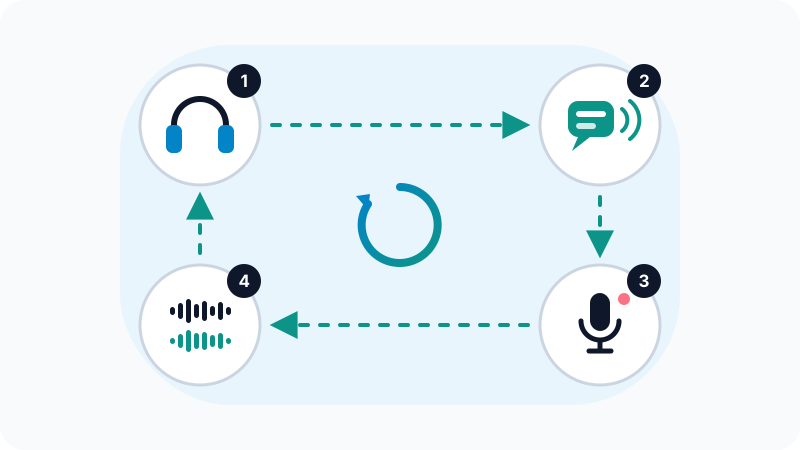
Stay with the same clip for a few days until you can shadow it smoothly, then pick a new one. Slowing the video down helps at first, and YouTube lets you change the playback speed from the video settings. If you enjoy learning from videos, read our guide to learning a language with YouTube, films and series.
Record yourself and compare
You can't judge your own pronunciation while you're speaking, because your brain is busy producing the words. A recording lets you hear what other people actually hear.
- Use your phone's built-in voice recorder, or Audacity, a free audio editor for Windows, macOS and Linux, if you'd like to see the waveform.
- Record one short sentence, play the original, then play yours straight after it.
- Listen for one thing at a time: first the stressed syllable, then one specific sound, then the rhythm.
- Keep your old recordings. Comparing today's recording with one from a month ago is the clearest way to see real progress.
Practise speaking with AI voice chat
AI assistants that support voice conversations, such as the voice mode in the ChatGPT app or live voice chat in Google Gemini, give you a low-pressure way to speak English every day. You can ask them to:
- Hold a simple conversation on a topic you choose, and speak more slowly.
- Give you pairs of words that differ by one sound (like "ship / sheep" or "fan / van") to practise.
- Explain where your tongue and lips should go for a sound such as "th".
Know their limits: they usually convert your speech to text first and are good at guessing what you meant, so they often won't notice a wrong sound. Treat them as a friendly speaking partner, not a pronunciation judge. We cover more ways to use them in how to learn a language with ChatGPT and other AI.
Sounds that often trouble Arabic speakers
Every first language brings its own tricky spots. If Arabic is your first language, these are common ones to check:
| Point | Example | Tip |
|---|---|---|
| /p/ vs /b/ | park / bark | For /p/, let out a small puff of air. Hold a tissue in front of your mouth: it should move for /p/. |
| /v/ vs /f/ | very / ferry | For /v/, rest your top teeth on your bottom lip and use your voice; you should feel a buzz. |
| Short /ɪ/ vs long /iː/ | ship / sheep | Keep /ɪ/ short and relaxed; stretch /iː/ with a slight smile. |
| Consonant groups | spring, street | Don't add a vowel before or inside the group ("ispring" or "sipring"). Say the consonants together. |
| Silent letters | knife, listen, island | Check the dictionary; English spelling often doesn't match the sound. |
Not every Arabic speaker has all of these, and it also depends on your dialect, so use your own recordings to build your personal list.
A 15-minute daily routine
- 3 minutes: look up three new words, play the audio and note the stressed syllable.
- 5 minutes: shadow your current clip.
- 3 minutes: record one sentence and compare it with the original.
- 4 minutes: speak freely: describe your day to an AI voice chat or record a short voice note.
Consistency beats long sessions. For apps that help with vocabulary and daily practice, see our list of the best apps to learn English.
Frequently asked questions
Do I need a native accent to speak English well?
No. The realistic goal is to be clear and easy to understand. Many confident English speakers keep an accent; what matters most is getting the key sounds right, stressing the right syllable and keeping a steady rhythm.
How long does it take to improve pronunciation?
It depends on your starting point and how often you practise. Short daily sessions of 10 to 15 minutes usually bring noticeable progress within a few weeks, but changing deep habits can take months.
Should I learn British or American pronunciation?
Either is fine. Pick the one you hear most or the one your goal needs, and try to stay consistent. Good learner's dictionaries give both versions, so you can always compare.
Can AI tell me exactly which sounds I get wrong?
General AI chat assistants are not reliable pronunciation judges, because they often understand you even when a sound is off. Use them for speaking practice, and use recordings and dictionary audio to check individual sounds.
Related tutorials
Language learning
Best Free Translation Tools: Google Translate, DeepL, Microsoft Translator and AI
Compare Google Translate, DeepL, Microsoft Translator and AI chatbots, with tips for more accurate translations and for keeping private text safe.
· 5 min read
Language learning
IELTS vs TOEFL vs Duolingo English Test: Which One Should You Take?
Compare IELTS, TOEFL and the Duolingo English Test: format, speaking section, scoring, who usually accepts each one, and how to prepare for the test you choose.
· 6 min read
Language learning
Best Apps to Learn English: Free and Paid Options Compared
The best-known apps for learning English, including Duolingo, BBC Learning English, Anki and Busuu: what each does well, free vs paid, and how to combine them.
· 6 min read