How to Learn a Language with YouTube, Films and Series
Turn YouTube videos, films and series into real language practice with a smart subtitle strategy, active watching, shadowing and comprehensible input.
Published 6 min read
In this article
- Why watching works: comprehensible input
- Choose content that matches your level
- The subtitle strategy: from your language to none
- Active watching: a simple method for one scene
- Shadow short lines to improve your speaking
- Save phrases, not just single words
- Useful built-in features and browser extensions
- Common mistakes to avoid
You can learn a language from YouTube, films and series if you watch actively: pick content slightly above your level, use subtitles in the language you're learning rather than your own, and work with short scenes by pausing, repeating and saving useful phrases. Relaxed watching helps too, but most of the learning happens in short, focused sessions.
In short: choose content you mostly understand, move from subtitles in your language to subtitles in the new language to none, rewatch short scenes, shadow a few lines out loud, and review the phrases you save.
Why watching works: comprehensible input
The linguist Stephen Krashen popularised the idea of comprehensible input: we acquire a language by understanding messages in it, especially when the material is a little above our current level. Films and videos are full of input with built-in help. Faces, gestures, the situation and the pictures all give you clues to the meaning.
The key word is comprehensible. If you understand almost nothing, you're hearing noise, not learning. If you understand everything, it's pleasant but you aren't stretching. Aim for content where you follow the main idea and meet a few new words or phrases every minute.
Choose content that matches your level
| Level | What to watch | Why it works |
|---|---|---|
| Beginner | Videos made for learners, slow and clear speech, children's programmes, short clips on everyday topics | Simple language and lots of visual support |
| Intermediate | Vlogs, cooking and travel channels, sitcoms, documentaries with a narrator | Everyday vocabulary and predictable situations |
| Advanced | Films, dramas, interviews, podcasts, stand-up comedy, a range of accents | Fast, natural speech and cultural references |
Two tricks help at any level. First, rewatch something you already know well in your own language: you know the story, so your attention is free for the words. Second, choose topics you genuinely care about. Interest keeps you watching, and staying consistent matters more than anything else.
The subtitle strategy: from your language to none
Subtitles are a tool, not a crutch, as long as you change how you use them over time.
- Stage 1: your language, or both. When you're starting out, use subtitles in your own language to follow the story, or two subtitle lines at once (one in each language) if your tool supports it. Notice how each line is said, not only what it means.
- Stage 2: subtitles in the language you're learning. This is the most useful stage for most learners. You connect the sound of words with their spelling and spot phrases you'd miss by ear.
- Stage 3: no subtitles. Start with scenes you've already watched, then try new episodes. Turn subtitles back on for a hard part, then off again.
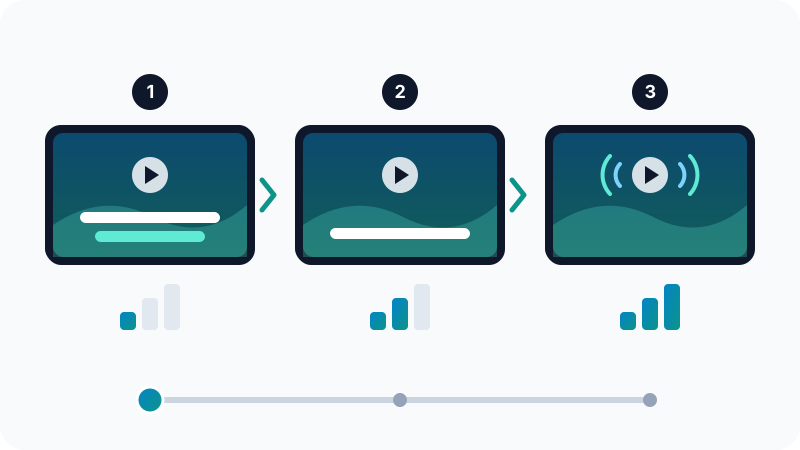
Move on when the current stage feels comfortable, not on a fixed schedule. It's normal to be at different stages for different shows.
Active watching: a simple method for one scene
Pick a scene of two to five minutes and go through it in passes:
- Watch it once for the general meaning, without pausing.
- Watch it with subtitles in the language you're learning, pausing whenever you hear a useful phrase. Write it down with the full sentence.
- Look up only the words that block your understanding or that keep coming up. A translation tool is handy here; see our list of free translation tools.
- Rewatch without subtitles and notice how much more you understand now.
One scene done this way teaches you more than an hour of passive watching. Afterwards, relax and enjoy the rest of the episode.
Shadow short lines to improve your speaking
Watching trains your ears, but your mouth needs practice too. Choose two or three lines from your scene, pause after each one and repeat it with the same rhythm and emotion as the actor. Then try speaking along with the character without pausing. This technique is called shadowing, and it's one of the best free ways to work on pronunciation. We explain it step by step in how to improve your English pronunciation.
Slowing the video down helps with fast speakers. YouTube lets you change the playback speed from the video settings, and on a computer the J, K and L keys jump back, pause and jump forward, which makes replaying a line quick.
Save phrases, not just single words
Writing down one word with its translation is quick, but you'll soon forget how to use it. Save the whole sentence instead, along with where you heard it. For example, not just "figure out" but "I can't figure out how this works."
Review your saved sentences a few times a week. A flashcard app with spaced repetition, such as Anki, shows you each card again just before you're likely to forget it. A notes app or a paper notebook works too, as long as you actually go back to it.
Useful built-in features and browser extensions
You don't need special software to start. Look for these:
- YouTube captions: many videos have captions written by the creator, and many also have automatic captions. Automatic captions can be wrong with accents, noise or names, so prefer the creator's captions when you can.
- YouTube transcript: on many videos you can open the full transcript on a computer: expand the video description and look for the transcript option. It's useful for reading ahead or finding a line again.
- Streaming services: Netflix and other services let you switch the audio and subtitle languages, but which languages are available differs from title to title and from country to country.
- Browser extensions: some extensions show two subtitle lines at once, let you click a word to see its meaning, or make it easy to replay the previous line. Install them only from the official extension store, read recent reviews and check which permissions they ask for. Our list of the best Chrome extensions explains how to pick safe ones.
Stick to legal sources: free YouTube channels, public broadcasters' websites and services you subscribe to. Pirate streaming sites often come with malware and aggressive pop-up ads.
Common mistakes to avoid
- Only watching with subtitles in your own language. You'll enjoy the show but learn little of the language.
- Picking content that's far too hard. If you're lost after five minutes, choose something easier and come back later.
- Never rewatching. Repetition is where new words stick.
- Collecting words without reviewing them. A long list you never open doesn't help.
- Watching without ever speaking. Add a few minutes of shadowing to each session.
To add structured vocabulary and grammar practice alongside your watching, see our guide to the best apps to learn English.
Frequently asked questions
Should I watch with subtitles in my language or in the language I'm learning?
Early on, subtitles in your own language help you follow the story, but they teach you little of the new language. Switch to subtitles in the language you're learning as soon as you can follow most of it, then try some scenes with no subtitles at all.
How much should I watch each day?
There's no magic number. Regular exposure matters more than long sessions: 20 to 30 minutes of focused watching on most days, plus some relaxed watching for fun, is a realistic start.
Can I learn a language just by watching series?
Watching builds listening and vocabulary, but on its own it rarely makes you a confident speaker or writer. Combine it with speaking practice, reviewing the phrases you save, and a little grammar study.
Are automatic captions on YouTube reliable?
They are often decent for clear speech, but they make mistakes with names, strong accents, background noise and fast talk. Prefer videos with captions added by the creator, and double-check anything that looks odd.
Related tutorials
Language learning
Best Free Translation Tools: Google Translate, DeepL, Microsoft Translator and AI
Compare Google Translate, DeepL, Microsoft Translator and AI chatbots, with tips for more accurate translations and for keeping private text safe.
· 5 min read
Language learning
IELTS vs TOEFL vs Duolingo English Test: Which One Should You Take?
Compare IELTS, TOEFL and the Duolingo English Test: format, speaking section, scoring, who usually accepts each one, and how to prepare for the test you choose.
· 6 min read
Language learning
How to Improve Your English Pronunciation with Free Online Tools
Improve your English pronunciation for free with dictionary audio, phonetic symbols, shadowing, recording yourself, YouGlish and AI voice practice.
· 6 min read