JavaScript for Beginners: Learn the Basics and Write Your First Code
A beginner-friendly JavaScript tutorial: run code in the browser console, learn variables, functions, conditions, loops and arrays, then make a button work.
Published 7 min read
In this article
JavaScript is the programming language of the web: it runs in every modern browser and makes pages interactive, and with Node.js it also runs on your computer and on servers. In this guide you'll run your first line of JavaScript in the browser console, learn the core building blocks, and make a real button respond to clicks.
The quick version: open your browser's developer console, type console.log("Hello") and press Enter. You've just run JavaScript. Next, learn variables, functions, conditions, loops, arrays and objects, then use them on a simple web page.
What JavaScript is and where it runs
A web page is usually built from three layers:
- HTML gives the page its structure: headings, paragraphs, buttons.
- CSS controls the look: colours, fonts, layout.
- JavaScript adds behaviour: reacting to clicks, checking forms, updating content without reloading the page.
JavaScript started in the browser, but today it also runs outside it thanks to Node.js, a runtime that executes JavaScript files from the terminal. That's why it appears on both sides of web development; if those terms are new, read frontend vs backend.
| In the browser | In Node.js | |
|---|---|---|
| How you run it | Console or a <script> in an HTML page |
node app.js in the terminal |
| Can change web pages (DOM) | Yes | No, there is no page |
| Access to files on your disk | Only files the user picks | Yes |
| Typical use | Interactive websites | Servers, tools, scripts |
The core language (variables, functions, loops) is the same in both places. What differs is what's around it.
Run your first code in the browser console
- Open any web page in Chrome, Edge or Firefox.
- Press F12 (or right-click the page and choose Inspect), then open the Console tab.
- Type these lines one at a time and press Enter after each:
console.log("Hello, Taqnio!");
2 + 3
The first prints Hello, Taqnio! and the second shows 5. console.log is your main tool for seeing what your code is doing, so you'll use it constantly.
Some browsers block pasting into the console the first time and ask you to confirm. Typing the code yourself is better practice anyway. And as a safety rule, never paste code a stranger sends you into the console: it runs with access to the page you are logged into.
Running a file with Node.js
When you want to save your code, install the LTS version of Node.js from nodejs.org, check it with node --version, create a file called app.js and run it:
node app.js
A good editor makes this much easier; see essential VS Code settings and extensions.
Variables: let and const
A variable is a named box that holds a value.
let age = 25;
age = 26;            // let allows a new value
const name = "Sara"; // const cannot be reassigned
console.log(name, age); // Sara 26
Start with const, and switch to let only when the value really needs to change. If you try to reassign a const, you get TypeError: Assignment to constant variable.
Data types you'll use every day
const city = "Riyadh";  // string (text)
const price = 19.5;     // number (whole or decimal)
const isOpen = true;    // boolean (true or false)
let notSet;             // undefined (no value yet)
const empty = null;     // null (deliberately empty)

console.log(typeof city, typeof price, typeof isOpen); // string number boolean
Watch out for one classic surprise: + joins text instead of adding when one side is a string.
console.log("5" + 3);         // 53
console.log(Number("5") + 3); // 8
Functions, conditions and loops
Functions
A function is a reusable block of code with a name:
function greet(name) {
  return "Hello, " + name + "!";
}

const add = (a, b) => a + b; // arrow function, a shorter form

console.log(greet("Omar")); // Hello, Omar!
console.log(add(2, 3));     // 5
You can also build text with a template literal, using backticks: `Welcome, ${name}`.
Conditions
const score = 72;

if (score >= 90) {
  console.log("Excellent");
} else if (score >= 60) {
  console.log("Passed");
} else {
  console.log("Try again");
}
To compare values, use === (strict equality). The older == converts types first, so 5 == "5" is true while 5 === "5" is false.
Loops
for (let i = 1; i <= 3; i++) {
  console.log("Round " + i);
}

let count = 3;
while (count > 0) {
  console.log(count);
  count--;
}
The for loop prints Round 1 to Round 3; the while loop counts down 3, 2, 1.
Arrays and objects
An array is an ordered list; positions start at 0.
const fruits = ["apple", "banana", "orange"];
fruits.push("mango");       // add to the end
console.log(fruits[0]);     // apple
console.log(fruits.length); // 4

for (const fruit of fruits) {
  console.log(fruit);
}
An object groups related values under names (keys):
const user = { name: "Sara", age: 25, city: "Riyadh" };
console.log(user.name); // Sara
user.age = 26;          // allowed, even though user is const
const stops you from replacing the whole object, but you can still change what's inside it. Most real data you'll handle, such as the JSON returned by web APIs, is arrays of objects.
Your first DOM example: make a button work
The DOM is the browser's live model of the page, and JavaScript can read and change it. Create a folder with two files.
index.html:
<!DOCTYPE html>
<html lang="en">
<head>
  <meta charset="UTF-8">
  <title>My first JavaScript</title>
</head>
<body>
  <button id="btn">Click me</button>
  <p id="msg">No clicks yet</p>

  <script src="app.js"></script>
</body>
</html>
app.js:
const btn = document.getElementById("btn");
const msg = document.getElementById("msg");
let clicks = 0;

btn.addEventListener("click", () => {
  clicks++;
  msg.textContent = "Clicks: " + clicks;
});
Open index.html in your browser by double-clicking it, then click the button. Each click runs the function, increases the counter and updates the paragraph.
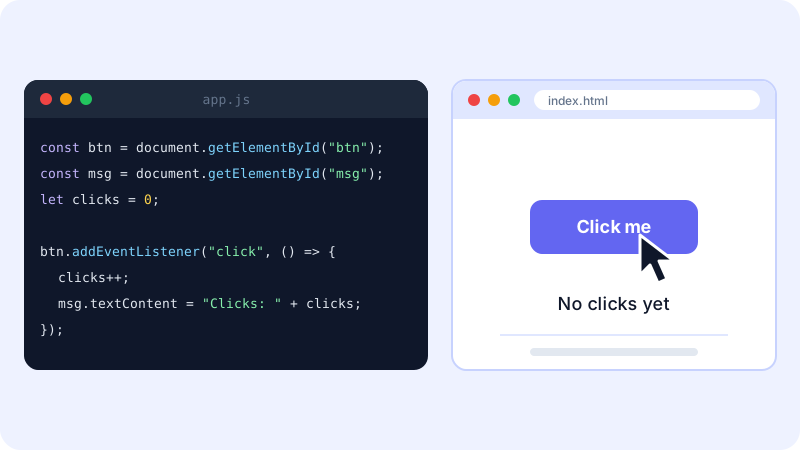
Notice the <script> tag sits at the end of <body>. That way the button already exists when the script looks for it.
Early JavaScript errors and what they mean
| Mistake | What you see | Fix |
|---|---|---|
| Script runs before the element exists | Cannot read properties of null |
Put <script> at the end of <body>, or add defer to it |
| Misspelled or wrongly capitalised name | ReferenceError: ... is not defined or ... is not a function |
JavaScript is case-sensitive: getElementById, not getElementByID |
= instead of === in a condition |
The condition assigns a value instead of comparing | Use = to assign and === to compare |
Reassigning a const |
TypeError: Assignment to constant variable. |
Use let if the value must change |
| Adding text and numbers | "5" + 3 gives "53" |
Convert first with Number() |
When something breaks, open the console first. The error message usually names the problem and the line number.
Where to go after the basics
- Rebuild the button page from memory, then extend it: add a reset button, or show a message after ten clicks.
- Learn array methods such as
mapandfilter, which you'll use all the time. - Learn
fetchto load data from an API, and practise with a small project like a to-do list. - When you're comfortable, try Node.js scripts, and later a framework.
For a full roadmap, read how to start learning programming from zero. The best free reference while you learn is MDN, which explains every feature with examples.
Official sources: MDN JavaScript Guide · MDN: Introduction to the DOM · Node.js
Frequently asked questions
Is JavaScript the same as Java?
No. They are two different languages with different designs and uses. The similar name is a historical naming choice, so learning one does not mean you know the other.
Do I need to install anything to start learning JavaScript?
No. Every modern browser has a JavaScript engine and a developer console, so you can start right now. Install Node.js later when you want to run JavaScript files from the terminal.
Should I learn HTML and CSS before JavaScript?
Basic HTML and CSS help a lot, because on websites JavaScript mostly changes the page they build. You can learn the language basics in the console in parallel, then combine all three in small pages.
Should I use var, let or const?
Use const by default and let when the value needs to change. var is the older way to declare variables and has different scoping rules; you will see it in older code, but new code rarely needs it.
Related tutorials
Programming
SQL for Beginners: Create Your First Database and Write Queries
Learn SQL from zero with SQLite: create a table, insert data, and use SELECT, WHERE, ORDER BY, UPDATE, DELETE, GROUP BY and JOIN in clear, tested examples.
· 6 min read

Programming
Free and Subsidised Coding Courses in Saudi Arabia and the Gulf (2026 Guide)
Free and subsidised ways to learn coding in Saudi Arabia and the Gulf: Tuwaiq Academy, Doroob, SDAIA Academy, Misk, 42 Abu Dhabi and free global courses.
· 6 min read
Programming
How to Use AI to Help You Code (A Practical Guide for Beginners)
Learn how to use AI assistants like ChatGPT, Claude and GitHub Copilot to write, explain and debug code, plus the mistakes to avoid when coding with AI.
· 6 min read