SQL for Beginners: Create Your First Database and Write Queries
Learn SQL from zero with SQLite: create a table, insert data, and use SELECT, WHERE, ORDER BY, UPDATE, DELETE, GROUP BY and JOIN in clear, tested examples.
Published 6 min read
In this article
SQL (Structured Query Language) is the standard language for storing, reading and changing data in relational databases. With a handful of commands such as CREATE TABLE, INSERT and SELECT, you can build a small database and ask it real questions. This guide uses SQLite, which is free and needs no server, and every example below was run and checked.
Short answer: a database stores data in tables of rows and columns. You create a table with CREATE TABLE, add rows with INSERT, read them with SELECT ... WHERE ... ORDER BY, change them with UPDATE and DELETE, summarise with COUNT and GROUP BY, and combine tables with JOIN.
What is a relational database?
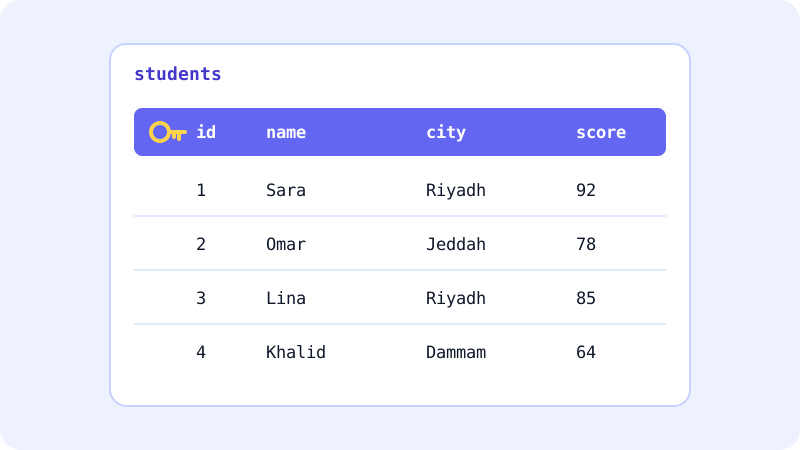
A relational database organises data into tables, a bit like sheets in a spreadsheet, but with stricter rules:
- A table holds one kind of thing, for example
students. - Each column is one property with a fixed meaning:
name,city,score. - Each row is one record: one student.
- A primary key (here
id) is a column whose value is unique for every row, so you can always point to exactly one record.
"Relational" means tables can be linked to each other through these keys, which you'll do with JOIN later.
Where to practise SQL for free
| Option | What it is | Good for |
|---|---|---|
| SQLite Fiddle | Runs SQLite in your browser, on sqlite.org | Trying queries with nothing to install |
sqlite3 command-line tool |
The official SQLite shell | Learning in the terminal |
| DB Browser for SQLite | A free, open source desktop app | Seeing tables visually |
Python's sqlite3 module |
Built into Python | Using SQL from your own programs |
To use the command-line tool, download it from the official download page on sqlite.org (macOS usually includes it already). Then open or create a database file:
sqlite3 school.db
Two settings make results easier to read, and .quit exits:
.headers on
.mode column
If you already know some Python, you can run the same SQL through its built-in sqlite3 module; see Python for beginners.
Create your first table
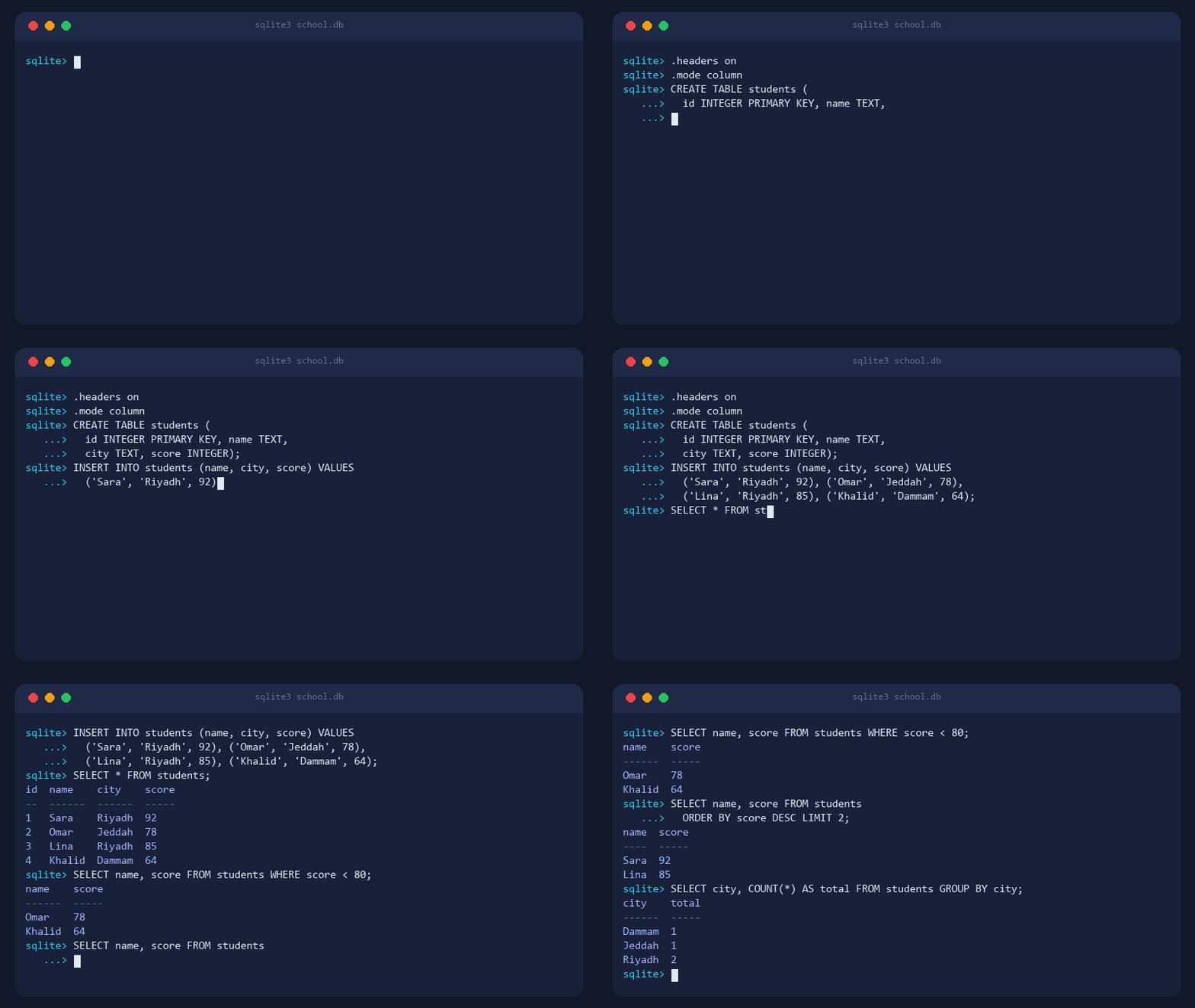
CREATE TABLE students (
  id INTEGER PRIMARY KEY,
  name TEXT NOT NULL,
  city TEXT,
  score INTEGER
);
Each line defines a column and its type. NOT NULL means a row can't be saved without a name. In SQLite, a column declared INTEGER PRIMARY KEY fills itself in: if you don't supply an id, SQLite gives the new row the next number automatically.
Type .tables to list your tables, and .schema students to see how the table was defined.
Add data with INSERT
INSERT INTO students (name, city, score) VALUES ('Sara', 'Riyadh', 92);

INSERT INTO students (name, city, score) VALUES
  ('Omar', 'Jeddah', 78),
  ('Lina', 'Riyadh', 85),
  ('Khalid', 'Dammam', 64);
Text values go in single quotes, numbers don't. Every statement ends with a semicolon; in the sqlite3 shell, a missing ; just leaves it waiting for more input.
Read data with SELECT, WHERE, ORDER BY and LIMIT
* means "all columns":
SELECT * FROM students;
id  name    city    score
--  ------  ------  -----
1   Sara    Riyadh  92
2   Omar    Jeddah  78
3   Lina    Riyadh  85
4   Khalid  Dammam  64
Choose columns and filter rows with WHERE:
SELECT name, score FROM students WHERE city = 'Riyadh';
name  score
----  -----
Sara  92
Lina  85
WHERE accepts comparisons such as =, <> (not equal), >, <, >= and <=, combined with AND and OR. To sort and keep only the top results:
SELECT name, score FROM students ORDER BY score DESC LIMIT 2;
This returns Sara (92) and Lina (85). DESC sorts from highest to lowest; ASC, the default, does the opposite.
Count and group: COUNT, AVG and GROUP BY
Aggregate functions turn many rows into one answer:
SELECT COUNT(*) FROM students;                  -- 4
SELECT COUNT(*) FROM students WHERE score >= 80; -- 2
SELECT AVG(score) FROM students;                 -- 79.75
GROUP BY calculates the answer for each group separately:
SELECT city, COUNT(*) AS total
FROM students
GROUP BY city
ORDER BY total DESC, city;
city    total
------  -----
Riyadh  2
Dammam  1
Jeddah  1
AS total gives the result column a readable name.
Primary keys and your first JOIN
Real databases split data across several tables. Here's a second table that records which courses each student takes:
CREATE TABLE enrollments (
  id INTEGER PRIMARY KEY,
  student_id INTEGER REFERENCES students(id),
  course TEXT
);

INSERT INTO enrollments (student_id, course) VALUES
  (1, 'Python'),
  (1, 'SQL'),
  (3, 'JavaScript');
student_id stores the primary key of a student instead of repeating their name, city and score. A column like this is called a foreign key. One detail: SQLite only enforces foreign keys after you run PRAGMA foreign_keys = ON;.
JOIN matches rows from both tables:
SELECT students.name, enrollments.course
FROM students
JOIN enrollments ON enrollments.student_id = students.id;
name  course
----  ----------
Sara  Python
Sara  SQL
Lina  JavaScript
Omar and Khalid don't appear because they have no enrollments. A LEFT JOIN would include them, with an empty (NULL) course.
Change and delete data: UPDATE and DELETE
UPDATE students SET score = 70 WHERE id = 4;
DELETE FROM students WHERE id = 2;
The first changes Khalid's score to 70; the second removes Omar's row.
Warning: always include a WHERE clause. UPDATE students SET score = 0; changes every row, and DELETE FROM students; empties the whole table, without asking for confirmation. Safe habits:
- Run a
SELECTwith the sameWHEREfirst, and check that it returns only the rows you expect. - Filter by the primary key (
WHERE id = 4) when you mean one specific row. - Keep a copy of your
.dbfile before big changes. With SQLite, that's just copying a file.
After your first query
- Design a small database of your own: books you've read, expenses, or a to-do list, with two linked tables.
- Learn
LEFT JOIN,LIKEfor text search, andHAVINGto filter groups. - Connect SQL to code. Most web apps send SQL from a back end and return the results through an API; see what an API is.
- Try PostgreSQL or MySQL once SQLite feels easy; most of what you learned carries over.
For a full study plan, read how to start learning programming from zero.
Official sources: SQLite documentation · SQLite Fiddle · MDN glossary: SQL
Frequently asked questions
Is SQL a programming language?
SQL is a language made specifically for working with data in relational databases. It is declarative: you describe the result you want and the database works out how to get it. Most developers learn it alongside a general language such as Python or JavaScript.
Which database should I use to learn SQL?
SQLite is the easiest start because the whole database is a single file and there is no server to set up. The basics you learn carry over to PostgreSQL, MySQL and SQL Server, with small differences in syntax and data types.
Do SQL keywords have to be written in capital letters?
No. Keywords such as SELECT and select work the same. Capitals are just a common convention that makes queries easier to read. Values inside quotes are different: whether 'Riyadh' matches 'riyadh' depends on the database and its settings.
What is the difference between SQL and NoSQL databases?
SQL databases store data in tables with a defined structure and relationships between them. NoSQL is a broad name for other models, such as document or key-value stores. Many projects use SQL databases, so the basics are worth learning either way.
Related tutorials
Programming
JavaScript for Beginners: Learn the Basics and Write Your First Code
A beginner-friendly JavaScript tutorial: run code in the browser console, learn variables, functions, conditions, loops and arrays, then make a button work.
· 7 min read

Programming
Free and Subsidised Coding Courses in Saudi Arabia and the Gulf (2026 Guide)
Free and subsidised ways to learn coding in Saudi Arabia and the Gulf: Tuwaiq Academy, Doroob, SDAIA Academy, Misk, 42 Abu Dhabi and free global courses.
· 6 min read
Programming
How to Use AI to Help You Code (A Practical Guide for Beginners)
Learn how to use AI assistants like ChatGPT, Claude and GitHub Copilot to write, explain and debug code, plus the mistakes to avoid when coding with AI.
· 6 min read