Best Free Website Hosting: Cloudflare Pages, GitHub Pages, Netlify and Vercel Compared
Compare the best free hosting for static sites, including GitHub Pages, Cloudflare Pages, Netlify and Vercel, and learn which one suits your project.
Published 6 min read

In this article
The best free website hosting for most beginners is a static hosting platform such as Cloudflare Pages, GitHub Pages, Netlify or Vercel. All four can host HTML, CSS and JavaScript sites for free, give you HTTPS automatically, deliver your site through a global network, and let you connect your own domain. The right choice depends on how you like to deploy and whether you need extra features like serverless functions.
In short: for a simple static site any of the four works well; pick GitHub Pages if your code already lives on GitHub, Cloudflare Pages or Netlify for an easy all-round option, and Vercel if you build with Next.js. Always check the current free-tier limits and terms of use.
What "free hosting" actually means today
A few years ago, free hosting usually meant a slow server covered in ads. Modern free hosting is different. Platforms built for developers offer free tiers that typically include:
- Hosting for static files: HTML, CSS, JavaScript, images and fonts.
- Automatic HTTPS: a free security certificate, so your site loads with the padlock.
- A free subdomain: something like
your-name.github.iooryour-project.pages.dev. - Custom domain support: point your own domain at the site at no extra hosting cost.
- A content delivery network (CDN): copies of your site served from locations around the world, so it loads fast for visitors everywhere.
What you don't usually get on these free tiers is a traditional server running PHP and a database, which is what WordPress needs.
Static vs dynamic sites: what you can host for free
This is the most important thing to understand before choosing:
- Static site: the files you upload are the files visitors receive. Personal pages, portfolios, landing pages, documentation and blogs made with static site generators (such as Hugo, Jekyll, Astro or a static Next.js export) all fit here.
- Dynamic site: the server builds each page when someone visits, often using a database. WordPress, forums and online shops are typical examples.
Static sites are simple, fast and cheap to host, which is why they can be free. If you're building your first site by hand, it will be static. Our guide on how to build a website from scratch walks you through making one.
Some platforms also offer serverless functions: small pieces of backend code that run on demand. They let a mostly static site handle things like a contact form without a full server.
The main free hosting options
The platforms below change their plans from time to time, so treat this as a general overview and confirm the details on each official pricing page.
GitHub Pages
GitHub Pages publishes a site directly from a GitHub repository. It's a natural fit if you already use Git, and it has built-in support for the Jekyll static site generator. Your free address is username.github.io.
It hosts static files only, with no server-side code. GitHub's usage policy also says Pages isn't intended for running an online business or e-commerce site, so it's best for personal projects, portfolios, documentation and open-source project sites. If you're new to Git, start with our Git and GitHub guide.
Cloudflare Pages
Cloudflare Pages deploys sites from a Git repository or from files you upload directly, and serves them on Cloudflare's global network. Your free address ends in .pages.dev. It supports many popular frameworks, gives you preview links for each change, and can run serverless functions.
It's especially convenient if your domain's DNS is already managed by Cloudflare. We have a separate guide on connecting your domain to Cloudflare Pages.
Netlify
Netlify was one of the first platforms to make "push to Git, get a live site" popular. It supports Git-based deployment, drag-and-drop uploads, preview deployments and serverless functions, and it has built-in extras such as form handling. Free sites get a .netlify.app address.
Vercel
Vercel is made by the team behind Next.js, so it offers the smoothest experience for Next.js projects, though it supports many other frameworks and plain static sites too. Free projects get a .vercel.app address. Vercel's free Hobby plan is meant for personal, non-commercial use, so check the terms if your site is for a business.
Quick comparison
| GitHub Pages | Cloudflare Pages | Netlify | Vercel | |
|---|---|---|---|---|
| Free subdomain | github.io |
pages.dev |
netlify.app |
vercel.app |
| Deploy from Git | Yes | Yes | Yes | Yes |
| Upload without Git | No, needs a repo | Yes | Yes | Via CLI |
| Custom domain + HTTPS | Yes | Yes | Yes | Yes |
| Serverless functions | No | Yes | Yes | Yes |
| Best known for | Simple sites from a repo | Speed and Cloudflare integration | Ease of use and extras | Next.js projects |
All four have limits on things like bandwidth, build minutes or requests on the free tier. These numbers change, so check each platform's current pricing page rather than relying on figures from an article.
How deployment works on these platforms
Most modern hosts follow the same simple flow. You write your site on your computer, push it to a Git repository, and the platform builds it and publishes it to its global network automatically.
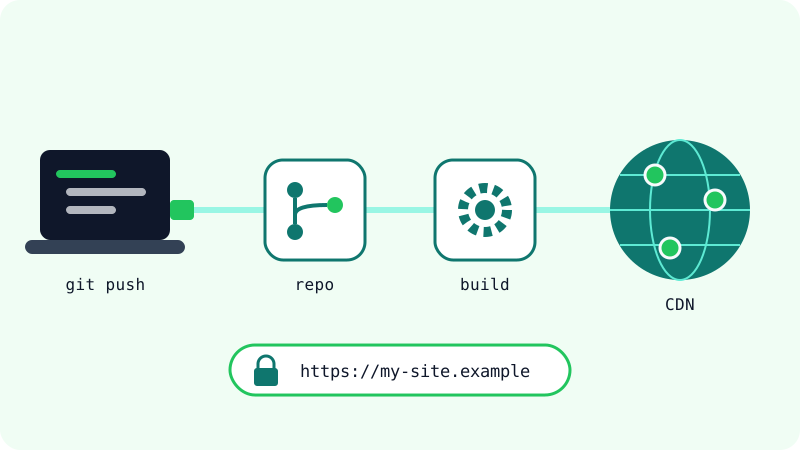
The typical first-time setup looks like this:
- Put your site's files in a GitHub (or GitLab) repository.
- Sign in to the hosting platform and connect your Git account.
- Choose the repository. For a plain HTML site there's usually no build command; for a framework, the platform often detects the right settings.
- Deploy. You get a live URL within a few minutes.
- From then on, every
git pushupdates the site automatically.
How to choose the right one
Ask yourself a few questions:
- Is it a simple personal or open-source project, and is your code on GitHub already? GitHub Pages is the least effort.
- Does your domain use Cloudflare DNS, or do you want strong performance with minimal setup? Cloudflare Pages is a good fit.
- Do you want drag-and-drop uploads or built-in form handling? Netlify makes that easy.
- Are you building with Next.js? Vercel gives the smoothest experience, but check that your use fits the Hobby plan terms.
- Is it a commercial site? Read each platform's current terms for its free plan before deciding.
There's no wrong answer for a first site. Moving a static site from one host to another is usually easy, because your files and Git repository stay the same.
Limits to check before you rely on free hosting
Free tiers are generous, but they are not unlimited. Before launching something important:
- Read the usage limits: bandwidth, number of builds, build time and function requests.
- Read the terms of use: some free plans exclude commercial use.
- Own your domain: a custom domain means you can switch hosts later without losing your address. See how to buy a domain on Namecheap.
- Keep your code in Git: your repository is your backup and makes moving hosts simple.
- Avoid unknown "free hosting" sites that inject ads or ask for unnecessary permissions. Stick to well-known platforms.
For a personal site, portfolio or small project, these free options are more than enough, and you can always upgrade later if your site grows.
Frequently asked questions
Is free website hosting really free, or are there hidden costs?
The hosting itself is free on these platforms' free tiers, including HTTPS and a subdomain. The main cost you might add is a custom domain name, which you buy separately. Costs only appear if you exceed the free limits or choose a paid plan.
Can I host a WordPress site on GitHub Pages or Cloudflare Pages?
Not directly. WordPress needs PHP and a database running on a server, and these platforms host static files. You would need regular web hosting for WordPress, or a tool that exports a WordPress site to static HTML.
Can I use my own domain name with free hosting?
Yes. GitHub Pages, Cloudflare Pages, Netlify and Vercel all let you connect a custom domain and provide free HTTPS certificates for it. You add the domain in the platform's settings and update your DNS records.
Is free hosting good enough for a business website?
For a simple static business site, the platforms' performance is usually more than enough. The bigger question is the terms of use: some free plans are limited to personal or non-commercial projects, so read the current terms before you launch a commercial site.
Related tutorials

Websites & hosting
How to Build Your Own Website from Scratch with No Experience
A beginner's step-by-step guide to building your first website with HTML and CSS, testing it on your computer, and publishing it online for free.
· 5 min read

Websites & hosting
How to Connect Your Domain to Cloudflare Pages (Step by Step)
Connect a Namecheap domain to a Cloudflare Pages site: add the site to Cloudflare, switch nameservers, attach the custom domain and redirect www.
· 6 min read

Websites & hosting
Docker for Beginners: What It Is and How to Use It Step by Step
A beginner-friendly Docker guide: what images and containers are, how to install Docker, the key commands, and how to build your first image.
· 6 min read