AI Skills Freelancers Can Sell: 6 Services and How to Deliver Them Well
Six AI-assisted services freelancers can offer, from writing and images to chatbots and automation, plus how to be honest with clients and check quality.
Published 6 min read
In this article
The AI skills freelancers can sell are not "using ChatGPT" on its own. They are services where AI speeds up the work and you add the judgment: writing and editing, marketing images, chatbot setup, workflow automation, prompt work and AI-assisted coding. Clients pay for a result they can rely on, so your real value is checking, editing and taking responsibility for the quality.
In short: pick one service, learn one or two tools deeply, always review and fact-check what AI produces, be open with clients about how you use it, and expect to spend months building a portfolio and reputation.
Why clients pay for AI work they could "do themselves"
Almost anyone can open an AI chat, so why would a business pay a freelancer? In practice, clients are paying for things the tool doesn't give them:
- Time. A shop owner would rather run the shop than spend evenings learning prompts.
- Knowing what good looks like. Many people try AI, get generic text or odd images, and give up. You know how to push the output until it's actually usable.
- Editing and fact-checking. AI can state wrong facts confidently. Someone has to catch that before it reaches customers.
- Responsibility. The client wants one person who owns the result and fixes problems.
That is why the best AI services are sold as outcomes ("10 product descriptions ready to publish"), not as "I will use AI for you".
Six AI services you can sell
1. AI-assisted writing and editing
Blog post drafts, product descriptions, email newsletters, social media captions, proofreading, and turning a video or podcast into an article. AI produces a fast first draft; you add research, the client's voice, a logical structure and accurate facts. Good prompting is the core skill here, and our guide on how to write good prompts is a solid starting point.
2. Image generation for marketing
Social media visuals, blog illustrations, product scene backgrounds, concept images and ad variations. Check each tool's licence for commercial use, watch for common flaws (strange hands, garbled text, accidental logos), and usually finish the image in a design tool so it matches the client's brand colours. Our list of free AI image generators helps you compare options.
3. Chatbot setup for small businesses
Many businesses want an assistant that answers common questions on their website or messaging channels. Your work is gathering the right information (prices, opening hours, policies), writing clear instructions for the bot, limiting what it is allowed to answer, testing it with tricky questions, and making sure customers can reach a human. Also make it clear to users that they are talking to a bot.
4. Workflow automation
Tools such as Zapier, Make and n8n connect apps together, and many now include AI steps. A typical project: a customer fills in a form, AI summarises the request and sorts it by type, the result is saved to a spreadsheet, and the team gets a notification. Document every automation you build, handle errors, and be clear about who pays for the tool subscriptions and usage costs.
5. Prompt work and AI training for teams
Building prompt libraries for common tasks, writing internal guidelines on safe AI use, and running short training sessions for staff. This works best combined with knowledge of a field, such as marketing, customer support or HR, because "prompt writing" alone is a narrow skill.
6. AI-assisted coding
Small websites, scripts, spreadsheet automation and bug fixes can go faster with AI help. But you still need to understand every line you deliver, test it and check it for security problems. If you are just starting, read how to use AI to help you code first.
Which service fits you?
| Service | Skills you need | Main risk to manage |
|---|---|---|
| Writing and editing | Strong writing in the target language | Wrong facts, generic tone |
| Marketing images | A good eye for design | Licence terms, visual errors |
| Chatbot setup | Organising information, testing | Bot giving wrong answers |
| Automation | Comfort with apps and logic | Silent failures, running costs |
| Prompt work and training | A field you know well, teaching | Being too generic to stand out |
| AI-assisted coding | Real programming basics | Bugs and security holes |
Pick the one closest to what you can already do. A good writer who adds AI will usually beat a beginner who only knows the tool.
Be honest with clients about AI use
Honesty protects your reputation, and it is increasingly expected:
- Check the rules first. Some clients and some freelance platforms have policies on AI use. Read them before accepting a project.
- Say how you use it. A simple line in your proposal is enough, for example: "I use AI tools for research support and first drafts; every deliverable is reviewed, edited and fact-checked by me."
- Protect client data. Don't paste confidential information, customer data or private documents into an AI tool without the client's permission. Where available, use plans or settings that don't use your data for training.
- Be clear about ownership. Copyright rules for AI-generated content vary by country and are still developing. Don't promise exclusive rights you can't guarantee.
- Never claim it's fully handmade if it isn't. If it comes out later, you lose the client and possibly your reviews.
Quality control: your real product
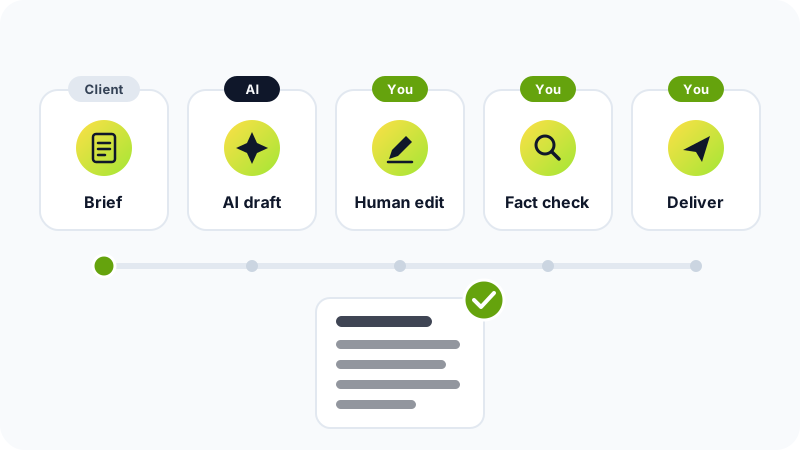
Here's a checklist to run before you deliver anything:
- Facts: verify names, numbers, dates and claims against reliable sources.
- Links and references: open every link. AI can invent sources that don't exist.
- Voice and brief: re-read the client's brief and check the tone, length and format match.
- Originality: make sure the text doesn't copy someone else's work and isn't generic filler.
- Images: zoom in on hands, faces, text and backgrounds.
- Code and automations: test with real and unusual inputs, including errors.
- Chatbots: ask it questions it shouldn't answer and confirm it declines politely.
- Final read: read the whole thing once more as if you were the client.
How to start and price your work
- Choose one service from the list and one or two tools to master.
- Build three sample projects, for example product descriptions for an imaginary shop, or an automation you use yourself.
- Create a simple portfolio that shows the before and after, and explains your review process.
- Offer your service on freelance platforms or to businesses you already know. Our guide on how to start freelancing from zero walks you through profiles and first clients.
For pricing, charge per deliverable or per project rather than per hour, because AI makes you faster and hourly pricing punishes that. Don't compete only on being the cheapest; compete on reliability and results. Rates vary a lot by market, skill and niche, and building steady work usually takes months, so keep other income while you grow.
Mistakes to avoid
- Delivering raw AI output without editing it.
- Selling "AI" as the service instead of a clear business result.
- Learning ten tools superficially instead of one tool well.
- Ignoring platform rules or the client's policy on AI.
- Promising results you can't control, such as guaranteed sales or rankings.
AI is a strong assistant, not a replacement for your judgment. Freelancers who combine a real skill with careful AI use and honest communication are the ones clients come back to.
Frequently asked questions
Do I need to know programming to sell AI services?
Not for most of them. Writing, editing, image creation and prompt work need no code. Chatbot setup and automation are easier if you are comfortable with technical tools, and AI-assisted coding still requires real programming knowledge.
Can I sell AI-generated images to clients for commercial use?
It depends on the tool's terms and the law in your country. Some tools restrict commercial use on certain plans, and copyright protection for purely AI-generated work is limited or unclear in many places. Read the terms of the tool you use and tell your client how the images were made.
Will clients pay less if they know I use AI?
Some might, but many clients pay for a reliable result, speed and your judgment rather than for hours of typing. Price by deliverable, explain what your review and editing add, and remember that hiding AI use damages trust far more if it comes out later.
Which AI tool should I learn first?
Start with one general assistant such as ChatGPT, Claude or Gemini and learn it well. Add specialised tools, such as an image generator or an automation platform, only when a real client project needs them.
Related tutorials
Earning online
How to Spot 'Make Money Online' Scams and Protect Yourself
Learn the warning signs of online money scams, from upfront fees and guaranteed returns to fake jobs and task apps, and how to check offers and report fraud.
· 6 min read

Earning online
How to Start Freelancing From Zero: A Practical Beginner's Guide
Start freelancing with no experience: pick a skill, build a small portfolio, use platforms like Upwork, Fiverr or Mostaql, set your prices and get paid safely.
· 7 min read
Earning online
How to Make Money From Your Website With Google AdSense
How Google AdSense works, what RPM and CPC mean, how to get your site approved, which pages and policies matter, and why earnings take months to grow.
· 6 min read